🎧 Listen to this article
Cold email response rates in 2026: average 1–3% for generic outreach, 15–25% for highly personalized campaigns (Woodpecker, 2025). The gap has never been wider — AI tools have made it trivially easy to blast thousands of templated emails, which means inboxes are more saturated than ever and the bar for what counts as "personalized" has risen dramatically.
The cold emails that still work in 2026 share one characteristic: they prove in the first sentence that you've actually researched the recipient. Not "I love your work" — something specific: a recent article they wrote, a company milestone they hit, a competitor move they should know about.
Dmitry Dragilev used cold email to grow Polar Polls to 40M pageviews (acquired by Google 2014), build JustReachOut to 5,000+ customers including Airbnb and HubSpot (acquired 2020), and earn press in Forbes, TechCrunch, and 200+ outlets without a PR agency. The 30 examples below are from real campaigns — broken down line by line with notes on why each element works.
Getting replies to cold emails in 2025 is brutal. AI floods inboxes with generic outreach. People delete emails before reading them. The old playbook is dead.
But here's what most people miss: The people who adapt are crushing it.
I should know. Cold email helped me build and sell four successful SaaS businesses to Google and SemRush—not through volume or tricks—through strategy.
Take a look at this cold email example:
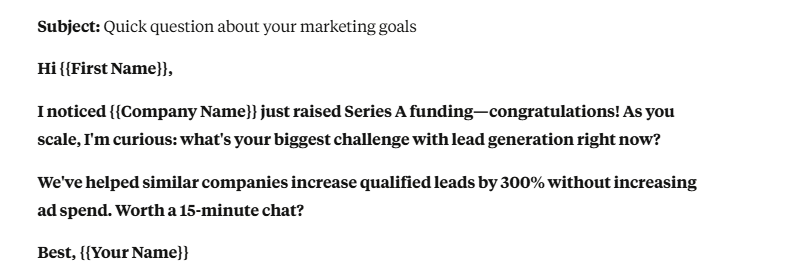
This email generated a 47% reply rate. Want to know why it worked so well?
In this guide, I’ll reveal the psychology triggers that make people actually want to reply and how to write emails that feel like personal messages, not sales pitches. I'll also give you 30 high-converting cold email examples and teach you the new framework that beats AI-detection.
Key Takeaways
- Generic emails are dead. Research-driven messages that mention real details—like a company’s latest launch or challenge—are the only ones that get noticed.
- Channel stacking wins. Relying on email alone? Expect ~3% response rates. Mix in LinkedIn and other touchpoints and watch that climb to 15%+.
- Play each channel to its strength. LinkedIn = building rapport. Email = showing value. Follow-ups = sealing the deal.
- Lead with value, not asks. If your first line screams “buy from me,” you’re already in the 93.9% of cold emails that fail.
- Deliverability is do-or-die. Warm new domains for 21+ days, skip the sketchy links, and protect your sender reputation—or risk blacklisting before you even start.
What is Cold Email?
Imagine opening your inbox and spotting another cookie-cutter message: “Hi [First Name], I love what your company is doing…” You roll your eyes, hit delete, and move on. That’s the reality of 2025. AI-generated emails are flooding inboxes; robotic and forgettable.At its core, cold email is simply reaching out to someone you don’t know—whether to pitch an idea, explore a partnership, or spark a new connection. But done right, it’s so much more than a shot in the dark.
A well-crafted cold email feels personal, human, and worth reading. It doesn’t scream spam; it starts a conversation.
Think of it like networking at a conference. You don’t walk up to a stranger and shove a sales pitch in their face. You break the ice, get to know them, and build rapport. Cold email works the same way: it’s about opening doors, not slamming sales pitches.
And when written with care, it can be one of the most powerful tools in your business toolkit.
Dmitry Dragilev · Cold email examples broken down to help you write your own
The 4 Core Components of a High-Converting Cold Email
Before we dive into advanced frameworks, it’s crucial to understand that every successful cold email is built on four core components. Nailing these fundamentals is non-negotiable.
1. The Compelling Subject Line This is your first impression. Its only job is to get the email opened. The best subject lines are short, personal, and spark curiosity. They feel like they were written by a human, not a marketing bot.
- Example:
Quick question about TopRanker.com - Example:
Your competitor's featured snippets
- Example: "I saw that TopRanker.com recently expanded into the European market—congratulations on the launch."
- Example: "We help newly expanded SaaS companies solve international SEO issues, preventing the traffic drops that often accompany such launches."
- Example: "Would you be open to a 15-minute call next week to discuss how you're approaching international keyword strategy?"
AIDA: The Secret to Emails People Actually Read
Great cold emails follow a simple formula called AIDA: Attention, Interest, Desire, Action. Here’s how it works in practice:Attention: Your subject line is the battlefield. You’ve got milliseconds to stand out, so use curiosity, personalization, or something unexpected.
Interest: Once they open, you’ve got 3 seconds. Show you get their world and pain points. Ditch the generic fluff.
Desire: Turn interest into want by making the value crystal clear. Use numbers, quick wins, or before/after snapshots that they can picture.
Action: End with one clear call-to-action. Not three. Not five. Just one simple next step.
Follow this flow, and your emails won’t just get read—they’ll get replies.
AIDA in Practice: A Real-World Example
Here's how to apply AIDA to transform a mediocre cold email into a high-converting one:Subject: Saw TopRanker.com's traffic dropped 40% last month
Hi Sarah,
[ATTENTION - Opening that creates urgency]
I noticed TopRanker's organic traffic took a significant hit after the March core update—from 47K to 28K monthly visitors.
[INTEREST - Demonstrating specific knowledge]
After analyzing your site using our diagnostic tool, I found 3 specific technical issues that are likely causing the drop:
- 73% of your pages have duplicate H1 tags
- Core Web Vitals failing on mobile (LCP at 4.2s)
- 1,247 orphan pages not in your sitemap
[DESIRE - Making the outcome tangible]
We just helped ProjectManager.com fix similar issues. Result? Their traffic recovered by 65% within 8 weeks, adding ~$127K in monthly recurring revenue.
[ACTION - One clear next step]
Worth a quick 15-minute screen share where I can show you exactly what we found?
Here's my calendar: [link]
Best,
Mike
Notice how each element builds on the previous one, creating momentum toward the desired action.PAS: The Problem-Agitation-Solution Approach
While AIDA creates desire, the PAS framework (Problem-Agitation-Solution) leverages a more powerful psychological trigger: loss aversion. People are 2x more motivated to avoid pain than to gain pleasure.The Psychology Behind PAS
Problem: Identify a specific, current pain point they're experiencing. This must be precise; vague problems get ignored.Agitation: Twist the knife by highlighting what happens if they don't solve it. What gets worse? What opportunities are missed? Make the cost of inaction clear.
Solution: Position yourself as the specific remedy to their pain. Not just any solution—the perfect solution for their exact situation.
PAS in Action: Making Pain Points Urgent
Subject: Your competitors are stealing your featured snippets
Hi David,[PROBLEM - Specific and measurable]
I noticed ContentKing.io lost position zero for 8 of your top money keywords to competitors in the last 30 days:
- "content optimization tools" → lost to Clearscope
- "content analysis software" → lost to MarketMuse
- "SEO content checker" → lost to Surfer
[AGITATION - Quantifying the impact]
Based on typical featured snippet CTRs, that's roughly 3,000 fewer visitors per month—potential customers now going to your competitors instead.
If this trend continues (and Google's latest update suggests it will), you could lose up to 40% of your organic traffic by Q2. That's approximately $74K in lost monthly revenue based on your average customer value.
[SOLUTION - Specific and proven]
We've developed a featured snippet recovery process that's helped SaaS companies reclaim 85% of lost snippets within 60 days.
Our approach:
- Snippet gap analysis (what exactly Google wants)
- Content restructuring (without rewriting everything)
- Strategic markup implementation
Best,
Emma
The key is making the problem feel urgent and solvable simultaneously.
Problem-Solution Framework: Addressing Pain Points
Understanding and articulating pain points is the foundation of effective cold email. But most salespeople guess at pain points instead of researching them properly.The 5 Categories of Business Pain Points
- Financial Pain
-
- Losing money directly
- Missing revenue opportunities
- Overspending on inefficient solutions
- Poor ROI on current investments
- Time/Productivity Pain
-
- Manual processes eat hours
- Redundant work across teams
- Slow turnaround times
- Missing deadlines regularly
- Competitive Pain
-
- Falling behind industry standards
- Losing market share
- Competitors launching features first
- Customer churn to alternatives
- Operational Pain
-
- System failures and downtime
- Process bottlenecks
- Team miscommunication
- Quality control issues
- Strategic Pain
-
- Lack of clear direction
- Missed market opportunities
- Poor positioning
- Inability to scale
Structuring Your Problem-Solution Email
Follow this proven 5-part structure:- Acknowledge Current Reality: Show you understand their situation without assumptions. "I see you're scaling rapidly—3 new enterprise clients this quarter alone."
- Identify Specific Problem: Be precise about what's broken or missing. "But your current infrastructure wasn't built for enterprise SLAs."
- Quantify Impact: Use numbers to make it real and urgent. "Those 15-minute outages? They're violating SLAs and risking $2M in contracts."
- Present Your Solution: Your specific approach to fixing their specific problem. "Our enterprise-grade infrastructure scales automatically and guarantees 99.99% uptime."
- Provide Proof: Evidence that your solution works. "We helped TechCorp achieve 100% SLA compliance while cutting infrastructure costs by 30%."
How to Write a Cold Email
Step 1: Identify Who You Want to Target
The first step in cold email success is knowing who you’re reaching out to. The best approach is to find businesses that use a tool or service that complements yours.For example, I run TopicRanker.com, a keyword research tool that helps users find low-competition, high-ranking keywords. My ideal prospects? People already using SEMrush because my tool works seamlessly with their workflow and enhances their SEO strategy.
Other examples:
- If you sell an email automation tool, target businesses already using Mailchimp or ActiveCampaign.
- If you offer a Shopify app, reach out to Shopify store owners who use complementary apps like Klaviyo.
- If you provide LinkedIn lead gen services, connect with B2B sales teams using LinkedIn Sales Navigator.
Step 2: Build a List of Your Ideal Prospects (Using TheirStack)
Once I know who to target, the next step is to find them. For this, I use TheirStack, which helps me identify companies already using software that complements TopicRanker. Here’s how I do it:- Define My Ideal Prospect: I start by targeting businesses that use tools related to TopicRanker. For example, since TopicRanker helps with keyword research, I’d focus on companies using SEMrush, which also serves SEO needs.
- Use TheirStack:
-
- I sign in to TheirStack and search for companies using the software I’m targeting (e.g., SEMrush).
- Then, I apply filters like industry, company size, and location to narrow down the results.
- Export the List of Businesses I am going to target: Once I have the list, I export it as a CSV file, which includes details like the company name, industry, and what tech they’re using.
- Organize and Clean Up: The next step is to clean and enrich the list using a tool called Clay. I upload the CSV into Clay, which helps me manage the list, remove duplicates, and enrich the data with more details, like decision-makers’ contact info.
Here is my export of the data from TheirStack:

Step 3: Figure Out Specific Names of Job Titles We Want to Go After
Once I’ve identified my ideal prospects, the next step is to find the specific people within those companies who I want to target. All of this happens directly in Clay, with the help of ChatGPT prompts.Here’s how it works:
- Target Specific Job Titles: I begin by identifying the key decision-makers whose roles will most likely benefit from TopicRanker. In my case, these are typically CMOs, Head of Content, and Head of SEO.
- Use ChatGPT Prompts in Clay:
- Inside Clay, I use specific ChatGPT prompts to search for the right job titles within my target companies.
- The prompts instruct ChatGPT to pull details from various data sources, such as LinkedIn, ZoomInfo, and company websites, to gather the organization's job hierarchy and structure.
- Find Specific Names: Based on these prompts, ChatGPT within Clay identifies the exact names and job titles of people who match my target roles. It then filters out irrelevant results, ensuring I’m only getting contacts that are a perfect fit for my cold email campaign.
- Refine the List: After Clay pulls the names and roles, I can quickly refine the list to focus on the most relevant contacts, ensuring they are the decision-makers in marketing, SEO, or content.
Here is what it looks like in Clay:

Step 4: Find Email Addresses
Now that I have a list of specific names and job titles from Step 3, the next step is to find the email addresses for these individuals. While finding the right person with the right title is the most challenging part, finding their email address is usually the easiest.Here’s how I do it:
- Clay Integrations:
Clay integrates with several powerful APIs to help find email addresses. Some of the most commonly used tools are:
- Hunter.io – A tool that helps find verified email addresses based on the domain.
- Clearbit – Another excellent tool for enriching contact data, including emails.
- Snov.io – A similar tool for discovering email addresses and lead enrichment.
- Apollo.io – A platform that provides contact data, including emails and phone numbers.
- Lusha – A tool that enriches contact details and helps find accurate emails.
- Find Emails in Clay: After integrating these APIs, I can use Clay to search for and pull the email addresses associated with each person from my list. The platform does this automatically, cross-referencing public databases, company websites, and other reliable sources.
- Verification: Most of these tools also offer email verification, ensuring the emails I collect are accurate and active. This helps reduce bounce rates and ensures my cold emails land in the right inbox.
Step 5: Buy Mailboxes & Add Redirects (Never Put Links in Cold Emails)
Most people never click links in cold emails. That’s just the reality.When someone receives an unsolicited email, their first move isn’t to click a link; it’s to check who sent it. Instead of clicking a link in the email copy, the recipient copy-pastes the sender’s email address domain into their browser to see if it looks legit. That’s how trust is built.
So if I’m emailing from dmitry@topicranker.com, they would copy paste “topicranker.com” and go to the website.
The Hidden Danger: Your Real Domain Can Get Blacklisted
One of the biggest risks of cold emailing is recipients marking your email as spam. If too many people do this, your domain gets flagged, and suddenly, you can’t send emails at all.This is why you should never send cold emails from your real main domain. If it gets blacklisted, it affects your entire business—outreach, client emails, everything.
In my case, I never cold email from dmitry@topicranker.com; I buy other domains to email from. Here is how it works…
Recap: The Wrong Move: Adding Links in Your Cold Emails
Including a link in your cold email does more harm than good:- It triggers spam filters, reducing deliverability.
- It looks suspicious
- It gets ignored because recipients prefer to verify you themselves.
Recap: The Smarter Move: Buy Similar Domains & Redirect Them
Instead of including links in an email, use this method:- Buy 10-15 domains from Maildoso that are similar to your main one. For example, if your primary site is yourcompany.com, grab variations like yourcompanyhq.com, yourcompanymail.com, or yourcompany.io.
- Use these domains for cold email outreach instead of your primary domain.
- Set up a redirect in Maildoso so that when people copy-paste the domain into their browser, they land exactly where you want them to—without ever clicking a link.
Example: How I Do It
I send emails from dmitry@topicranker.org. When recipients see the email, they naturally copy-paste topicranker.org into their browser. Instead of seeing a generic page, it redirects them to my app: SERP Gap Analyzer on SEMrush.Why does this work? Because when they land on that page, they see “TopicRanker Inc.” on SEMrush. That instantly builds credibility and makes them trust what I’m offering.
Warm Up Your Domains First
Before sending emails, warm up your new domains to build a positive reputation and improve deliverability. I like to use WarmUpInbox for this. Let the warm-up process run for 21 days before sending any outreach. You cannot start your campaign until you have warmed your inbox for at least 21 days. Take a look at how this looks here:
Remember: No Links in Cold Email
Cold email is all about trust. When you remove links and let people check you out naturally, they feel in control, making them far more likely to engage.Set up your domains, warm them up, and try this method in your next campaign. You’ll see the difference.
Step 6: Write Personalized Email Copy
This is where the real magic happens. Personalizing each email to resonate with the prospect is crucial, and I do this by using the research I gathered earlier. Using ChatGPT prompts within Clay, I gather insights on the prospect’s role, their company, and the tools they use, which helps me write highly relevant emails.Here’s how I approach it:
- Personalize with Details from Research: From my earlier research, I’ll mention their company, role, and tools or keywords they’re working with. This makes the email feel tailored specifically for them.
- Make the Introduction Relatable: I begin by referencing something relevant to their current business or objectives. This creates an immediate connection.
- A/B Test Subject Lines: Testing different subject lines is key.
Example: How I Do It
Here are some examples I use for TopicRanker:Primary Subject Lines:
- {{companyName}} <> Semrush
- {{companyName}} <> Semrush Top Ranking App
- Semrush-Backed App Finds Easy SEO Wins
- Can I Show You {{firstName}}?
- Semrush’s Recommended Tool for Quick Rankings
- Semrush’s Top App for Effortless SEO Growth
- Find SEO Gaps Fast—Semrush Supports This App
- Semrush on Steroids {{firstName}}
- {{firstName}}, Found Low-Hanging SEO Wins for {{companyName}}
- SEO Keywords You’re Missing, {{companyName}}
- Quick SEO Wins You Can Grab, {{companyName}}
- Easy Keywords for {{companyName}}—See What’s Open
- Keywords {{companyName}} Should Rank For (But Isn’t Yet)
- {{firstName}}, Found Easy Keywords for {{companyName}}!
Craft the Email Body
Once the subject lines are in place, I personalize the body of the email using the information I gathered. Here are two email variations for a prospect, Nathan Driver, SEO Manager at Rocket Media. Take a look at all the bolded things. These are personalized based on data from Clay. Also note, there are no links here at all!Email Body Version A:
From: dmitry@topicranker.orgSubject: RocketMedia <> Semrush Top Ranking App
Hi Nathan,
I noticed you manage SEO at Rocket Media and are a Semrush user—nice! I checked out your blog and saw you’re targeting highly competitive keywords like “HVAC” or “plumbing SEO.”
There are easier, high-intent keywords you could rank for with far less effort. That’s exactly why Semrush is actively promoting our app, SERP Gap Analyzer, on their app store. It’s a top-ranked app designed to help you find quick-win keywords. It scans your competitors’ top 10 Google results and pinpoints weak spots, so you can outrank them faster.
You may have already seen it featured on the Semrush App Store homepage, but if not, you can check it out [here] or take a quick look at our site. Curious if you’ve tried it yet?
Best, [Your Name]
P.S. Just open the Semrush App Store page, and you’ll see SERP Gap Analyzer at the top—Semrush is showcasing it right at the top!
Email Body Version B:
Hi Nathan,I noticed you’re managing SEO at Rocket Media and using Semrush—that’s smart! I looked at your blog and saw you’re targeting competitive keywords like “HVAC” or “plumbing SEO.” Those can be tough to rank for.
That’s why we created SERP Gap Analyzer, a top app on the Semrush App Store (you can find us right at the top of their page). It helps you find easy-to-rank keywords by spotting weaknesses in your competitors’ top 10 Google results, such as:
- Low authority scores compared to Rocket Media
- Outdated content in need of a refresh
- Missing keywords in title tags
- Slow page loads
- Poor readability
If you haven’t seen it yet, you can find us featured on the Semrush App Store homepage, or visit our site to learn more. Curious if you’ve given it a try, what do you think?
Best, [Your Name]
P.S. We’re right at the top of the Semrush App Store. Just look for SERP Gap Analyzer!
By combining the right subject line, a personalized introduction, and a clear value proposition, you significantly increase your chances of getting a response.
Step 7: Follow-Ups – Where the Magic Happens
The follow-up stage is where most responses come in. People are busy and might miss your initial email, but a gentle follow-up reminds them of your offer.I prefer three follow-ups. This is why: take a look at the replies from the campaign, most replies come from the last follow-up:
Here’s how I approach follow-ups:

Follow Up 1:
Hi {{firstName}},I'm just circling back on my last email. I wanted to make sure you saw it. Let me know your thoughts!
Best, %signature%
Follow Up 2:
Hey {{firstName}},Following up to see if my last email made it your way. Quick tip—SERP Gap Analyzer can help spot easy-to-rank keywords by identifying gaps competitors are missing.
Would love to hear your thoughts!
Best, %signature%
Follow Up 3:
{{firstName}}, could you give me a 👍 or 👎 if you’ve had a chance to read my last email?Just want to make sure it didn’t slip through the cracks.
Best, %signature%
The Psychology of Follow-Up Success
Why People Don't Respond:- 48% - Bad timing/too busy
- 25% - Not a priority right now
- 15% - Forgot/lost in inbox
- 7% - Need more information
- 5% - Not interested
Why Follow-Ups Work:
- Persistence: People might miss your first email or get distracted. A polite follow-up brings it back to the forefront.
- Polite but Direct: Each follow-up is polite, concise, and has a clear call to action, increasing the chances of engagement.
- Getting a Response: Even if it’s a simple “👍” or “👎”, a response means you’re in the door and can continue the conversation.
Follow-Up Best Practices
Timing Matters:- Space 3-7 days between touches
- Send Tuesday-Thursday
- 10 am or 2 pm recipient's time
- Avoid Mondays and Fridays
- First: Original subject
- Second: "Re:" + original
- Third: New angle/benefit
- Fourth: Question or urgency
- New information
- Different angle
- Helpful resource
- Industry insight
- Competitive intelligence
What NOT to Do in Follow-Ups
- "Just checking in"
- "Circling back"
- "Bumping this up"
- Copy-paste the same message
- Sound desperate or annoyed
- Send more than 5 without a response
- Follow up the same day
- Use aggressive language
Advanced Follow-Up Strategies
The Forwarded Email:Subject: Fwd: [Original subject]
Hi [Name],Forwarding this in case it's helpful.
Just helped [similar company] achieve [result].
Let me know if you'd like to discuss.
The Voicemail + Email Combo: Leave voicemail → Send email within 5 minutes:
Subject: Just left you a VM
Hi [Name],Just left you a quick voicemail about [topic].
The gist: [one-line summary]
When would be a good time to connect for 15 minutes?
The LinkedIn + Email Tag Team: Send email → LinkedIn message 2 hours later:
"Hi [Name], just sent you an email about [topic].
Thought I'd try here too in case you prefer LinkedIn.
Quick question: [relevant question]?"
Measuring Follow-Up Success
Track these metrics:- Response rate by follow-up number
- Positive vs negative responses
- Best performing subject lines
- Optimal spacing between touches
- Channel performance (email vs LinkedIn)
Avoiding Clichéd Openings
One of the quickest ways to get your cold email deleted is to start with the same tired phrases everyone uses. These clichés immediately signal "mass email" and trigger the delete reflex.❌ "I hope this email finds you well." Nobody cares about your hopes for their wellness
❌ "I know you're busy, but..." - Then why are you emailing?
❌ "I'm reaching out because..." - Get to the point
❌ "I wanted to touch base..." - Corporate speak = instant delete
❌ "Just following up on my previous email..." - Lazy and uninspiring
❌ "Allow me to introduce myself..." - This isn't 1952
❌ "I came across your profile and..." - So did 100 other salespeople
Fresh Openers That Actually Get Read
- The Specific Observation: "Noticed you're hiring 3 SDRs this month - scaling must be exciting but challenging."
- Why it works: Shows real research, creates relevance immediately.
- The Direct Question: "Quick question—how are you handling the 50% increase in support tickets since your launch?"
- Why it works: Provokes curiosity, demonstrates knowledge.
- The Honest Confession: "I'll be honest - I've been stalking your LinkedIn posts about remote work challenges and had to reach out."
- Why it works: Refreshingly honest, shows genuine interest.
- The Compliment + Twist: "Your recent post on sales automation was brilliant. But I respectfully disagree with one point..."
- Why it works: Flattery + intrigue = must read more.
- The Direct Value: "Found 3 technical SEO issues costing you ~500 visitors/day. Details below:"
- Why it works: Immediate value, no fluff.
- The Mutual Connection: "Sarah Chen said you're the person to talk to about scaling content operations."
- Why it works: Warm introduction feel, social proof.
- The Recent Event: "I saw you just closed Series B—congrats! I imagine standardizing sales processes across three times the team is now the top priority."
- Why it works: Timely, relevant, shows you're paying attention.
- The Pattern Interrupt: "This might be the shortest sales email you get today."
- Why it works: Unexpected, makes them curious.
- The Shared Experience: "Fellow Y Combinator alum here (W18) - know firsthand how brutal scaling customer success can be"
- Why it works: Instant credibility and connection
The Psychology Behind Great Openings
Great openings work because they:- Create pattern interrupts - Stand out from the 50 other emails
- Demonstrate research - Show this isn't mass blast
- Provide immediate relevance - Connect to their world instantly
- Spark curiosity - Make them want to read more
- Feel human - Sound like a real person, not a template
30 Cold Email Examples You Can Use
Crafting the perfect cold email can be challenging, especially when you need to grab attention in a crowded inbox. But with the right approach, a cold email can open the door to valuable connections and business opportunities.In this section, I’ve compiled 30 real-world cold email examples showing how to successfully approach different prospects. These examples cover a range of industries, job titles, and goals, from introducing a new product to forging partnerships and even generating sales.
Score a $3K Contract Cold Email
My old coach and current friend, Bryan Harris, is a cold email outreach beast! Why?His sales emails get incredible response rates!
Want to know the best part?
He shares his cold email templates to help you get the same response rate!
That’s how we have gems like this email:
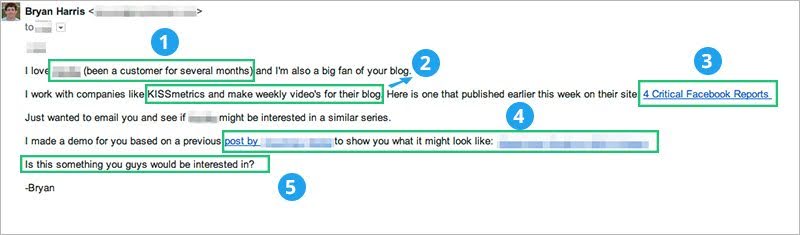
Do you see what makes Bryan’s email great?
- Bryan clearly states he is an ideal customer and familiar with the product. (But only say this if it’s the truth.)
- He drops a big name right in the second line. By telling the reader that an industry leader, KISSmetrics, trusts his work, he establishes respect.
- He links to an actual example of his recent work on the KISSmetrics blog.
- Offer value: This is where his email stands out from the other cold emails this target will ever receive. Bryan offers incredible value by showing what the final product might look like. Sure, it took an extra couple of hours, but by doing this, he ensures he’ll at least get noticed.
- He closes with a question to spark a conversation, rather than jumping right into a big “ask.” This increases his chances of getting a response.
What Can You Learn From This
If you give away tons of value …It means more work upfront for you and/or your sales team, but you’ll really stand out in the prospect’s inbox.
But I know what you’re thinking:
How can I apply Bryan’s techniques to my emails?
Try This Cold Email Template
I love [recipient’s company. I’m also a big fan of [compliment about a specific part of the recipient’s work].I [the kind of work you do]. I work with [mention a big-name potential client, if you can].
Here’s an example of my work: [link to the best example of your work or favorite part of your portfolio].
I just wanted to ask if [recipient’s company] might be interested in something similar.
I made a demo to show you what it might look like here: [link to custom sample of work you created upfront for the recipient].
Is this something you’d be interested in?
[Signature]
How to Blow Minds w/ Cold Email
If you’re familiar with modern digital marketing, you probably know Noah Kagan, formerly of Mint and Facebook, founder of AppSumo, SumoMe, and OkDork. Noah knows his stuff.He also gets hundreds of emails every month from people asking for his help.
The following cold email campaign, however, blew Noah’s mind.
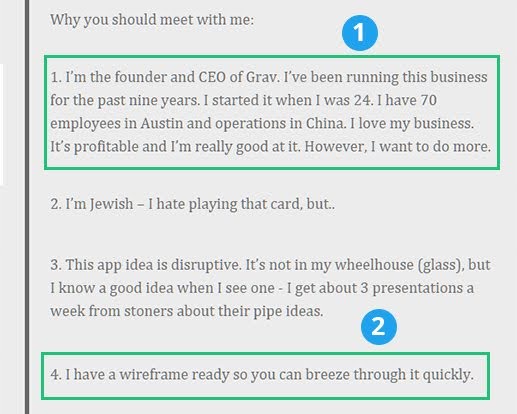
Noah has already done a pretty thorough breakdown of the email, so I won’t go into this in-depth. But there are a couple of things I wanted to point out:
- Successful people like to deal with other successful people. The sender, Dave Daily of Grav Labs, points out upfront that he knows his stuff really, really well. It might sound arrogant, but when you’re competing for the prospect’s attention of a busy person, you need to be upfront.
- Dave wanted to ask Noah about an app. So instead of fumbling around with an “idea,” he sketched out an entire wireframe. At a time when everyone and his grandma has an idea for an app, a wireframe alone means that you’re already way ahead of the pack.
The email is clearly about Noah — what he can get out of meeting Dave —not about Dave. This is a good practice to adopt in all your emails.
Also note the list format. There’s a reason why BuzzFeed works so well. People love to read lists, whether online or in emails.
What You Can Learn From It
Show that you mean business. A busy prospect’s inbox is no place to be shy. And to land a huge name, you likely need to do the extra work (like the wireframing in this example).You can also get away with writing longer emails if you structure them well. As you can see in this example, lists and a clear focus on how your offer benefits the receiver make the email a fast and engaging read.
Follow These Guidelines to Write One Yourself
Here are some guidelines to turn these cold email templates into winning emails for your business.- Flatter the recipient genuinely and honestly.
- Establish why your product/service will benefit them.
- Describe what makes you credible/successful.
- Suggest a specific and brief time frame for a meeting.
The Best Cold Email Pitch Ever
Didn’t I tell you that Bryan Harris is an absolute beast when it comes to writing a cold pitch?Here’s one of Bryan’s emails, but from the receiver's perspective (HubSpot).
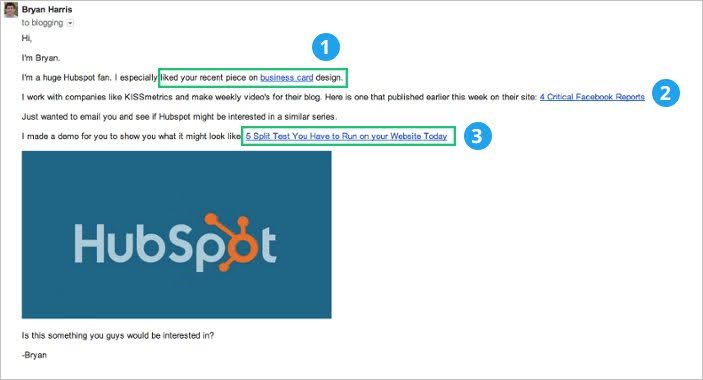
You’ll notice it’s the exact same cold pitch I discussed above, except this time …
It’s customized for Ginny Soskey, who manages content strategy for HubSpot.
Here’s the best part:
- By referring to Ginny’s latest post on the HubSpot blog, Bryan tells her he’s not just a random spammer. He’s taken the time to read the blog.
- One of HubSpot’s closest competitors is KISSmetrics. So mentioning them in the email helps catch Ginny’s attention.
- He doesn’t just share an idea, he makes an entire demo video. Making a video takes time. The free demo not only grabs the prospect’s attention but also gives HubSpot an idea of what the final product would look like.
And Ginny announced it was the “best cold email pitch” she’s ever received in a blog post that has been shared ~2,000 times.
What You Can Learn From It
Personalize your cold pitch!How do you grab a prospect’s attention?
Mention something the receiver did recently (check their blog or Twitter) in the first line. And make sure you’re genuine. Though this email just mentions the piece, citing a relevant takeaway from the article is better than a mere mention.
How To Land Meetings w/ Cold Email
Takipi is a tool that helps developers understand when their code breaks in production. However, it can be a tough sell to developers because it requires installation on a live server.Yet Iris Shoor, co-founder of Takipi, managed to get five installations from successful cold email alone — 1.5x more than what she got through introductions (without a sales rep or sales manager).
This is an example of an email she sent out to a company that used Scala:
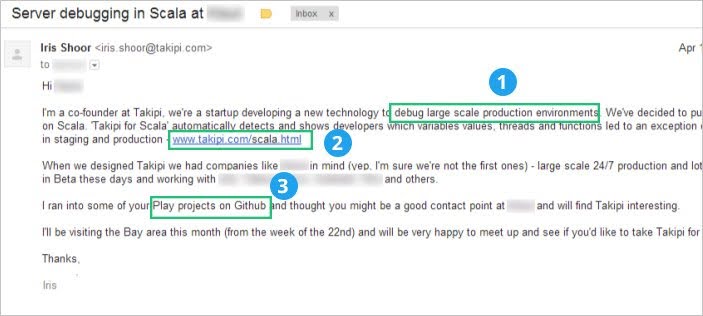
Lots of great stuff here:
- A nice, succinct intro. Iris gets right into what Takipi does and how it’s relevant to the company.
- Iris knows the company runs Scala, so instead of sending them to the homepage, she linked to Takipi’s Scala-focused landing page.
- She mentions the recipient’s GitHub page and recent projects to show she’s done her homework.
What You Can Learn From It
Even though you’re sending a cold email campaign to (probably) multiple people, craft each email for one single person.Don’t tell them anything they don’t need to hear …
Don’t mention anything that might be boring.
Instead:
Personalize your email for a particular person and explain how your product/service/company can solve that person’s problem.
Grab a Prospect’s Attention Cold Email
Scott from Life-Long-Learner.com shared an email that uses an interesting tool to create a powerful visual message.Here’s an example of his successful cold email templates from his blog:
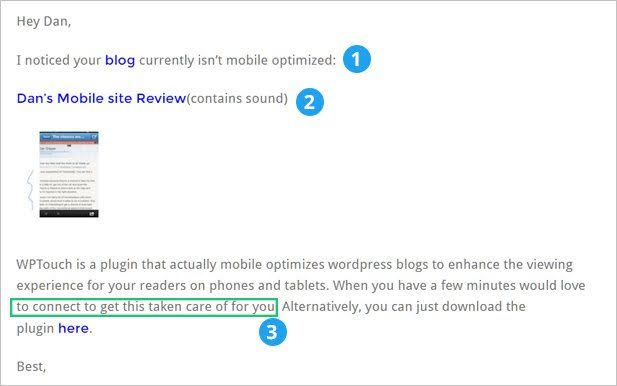
Scott has a breakdown on his blog, but here are his most important points:
- Scott jumps right in without an intro. That grabs the recipient’s attention and doesn’t waste time focusing on Scott.
- Scott doesn’t send a long email listing everything wrong with the blog's mobile version. Instead, he creates a visual presentation depicting what’s wrong (show, don’t tell). Also note the little sound warning — a nice touch that clarifies this is a video/audio walkthrough.
- Scott gives value by offering to take care of this problem for Dan. This could turn into a paid contract and a fruitful, long-term relationship.
What You Can Learn From It
Remember: Show, don’t tell.Instead of writing a 500-word email with abstract ideas, create a video or presentation showing your ideas in action.
Win Over a Founder Cold Email
This is a great cold email campaign from Sam Parr, founder of HustleCon, a startup event for non-tech people.It’s incredibly well-crafted with extensive personalization.
And yes, hours of work went into each email, but when you consider the rewards …
It was time well spent!
Here’s the email:
This email is different right from the very first word. It eschews all conventions and is just… fun.
It’s a hustler’s email, which is exactly what HustleCon is all about.
Here are the best parts:
- Love it or hate it, you can’t ignore that first line (reminder for marketers: what doesn’t stand out gets forgotten). Sam mentions Rick Marini’s (founder of BranchOut) past and the $200k job he turned down. That fact isn’t readily available, which means Sam is legitimately a fan. He comes across as authentic as a result.
- Sam drops the key info all bundled up in one sentence.
- Sam plays to Rick’s ego by telling him that he can come over and spread the “Marini gospel.” He knows that entrepreneurs who’ve reached Rick’s level of success care more about influence and spreading their ideas than making money.
- He doesn’t write a 500-word explanation. Instead? He links to a page that tells Rick more about the conference.
GIFs are a great way to personalize your message without being stuffy and corporate-y.

What You Can Learn From It
Have fun!And mirror your brand’s image in your language.
If you’re branding yourself as a fun, youthful alternative to conventional conferences, don’t use the same stuffy, traditional language in your emails.
Score an Interview Cold Email
John Corcoran was a writer for the Clinton White House, so you bet he knows a thing or two about high-stakes writing.John wrote a piece in the Art of Manliness where he mentioned Noah Kagan.
For a follow-up, he wanted to interview Noah about the importance of failure.
How’d he do it?
With this email:
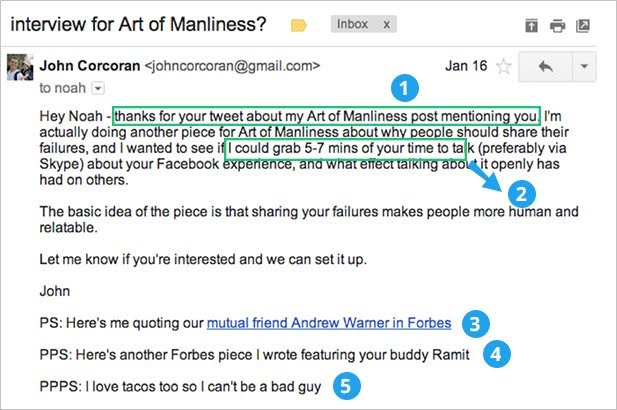
Now there’s a whole process before this email (covered here), but the email itself has lots of gems:
- John mentions his recent interaction with Noah on another platform. That’s a great way to warm up a cold email.
- It’s important to reassure a busy person that you won’t take up half their day — or even half an hour — with a request. John clears this upfront by mentioning the interview will take 5-7 minutes.
- John mentions Andrew Warner of Mixergy and his recent Forbes post. How does this help? It establishes that John and Noah have a common contact. This validates John's work, which has appeared in a reputable publication like Forbes.
- More namedropping.
- John knows how much Noah loves tacos.
What You Can Learn From It
You can also use this example if you mention a common connection.Remember: Even a distant connection is better than no connection.
Kickstart a Relationship Cold Email
This email from Sidekick is simple, clear, and well-thought-out. It isn’t designed to do anything fancy or win over celebrities to speak at your gig. Instead, it focuses on conversion rate — i.e., driving leads and relationships further down the sales pipeline.Take a look:
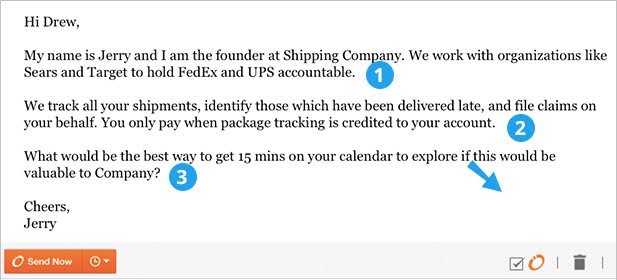
There’s nothing fancy going on here, but you’d be surprised by how many B2B salespeople, salespersons, and recruiters get it wrong.
This example is short, crisp, and clear; exactly what you’d want in a B2B email.
- A clear, simple introduction. Use a familiar example: People might not understand “logistics accountability,” but definitely understand FedEx and Target.
- The email focuses on benefits, not features. It does not mention any fancy tracking algorithm or smart platform. It’s all about how they can save the recipient time and money!
- The cold email campaign ends by asking for 15 minutes, a reassurance to a busy person.
What You Can Learn From It
Focus on benefits instead of features.This rule applies to everything – landing pages, sales letters, and emails.
Land a $15K Project Cold Email
Successful cold emails are all about writing the perfect pitch or personalizing the email to the extent that the cold prospect just can’t ignore it.However, this cold email template from Masswerks focuses on what you can achieve if you target the perfect audience.
Take a look at what a good fit for the ask and target audience looks like:
Looks like nothing special, right?
It has three lines, a simple subject line, and no fancy gimmicks.
Yet, it got Masswerks a $15K consulting gig. Why?
Because they focused obsessively on targeting the perfect potential client.
You can read about it on the blog post linked above, but here are the most important takeaways:
- Masswerks targeted growing companies that had already raised some funding. These businesses have their hands full and usually need help with UX and design work. Since these businesses are already looking for help, the opening line works like a charm.
- A brief overview of what Masswerks can do: increase sales, engagements, and conversion rate. The sales process is built around these three metrics: sales, engagements, and conversion rate.
What You Can Learn From It
Choose your targets wisely.A simple email can do a lot if you send it to the right people.
Don’t skimp on your homework …
Research your ideal customer thoroughly before you even send an email.
Grab Potential Customers Early Email
This one-paragraph message from Ash Maurya is chock-full of wins.It ticks all the right boxes: It’s succinct, it’s targeted, it’s personalized, and it has a clear objective.
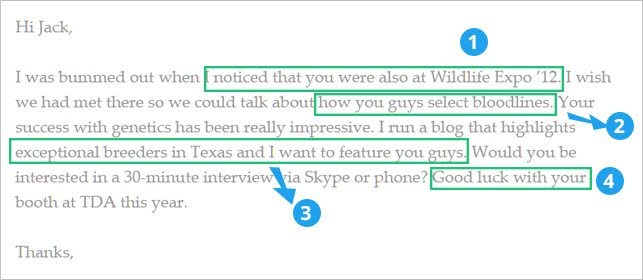
Everything I love about cold email templates like this one:
- Ash mentions he saw the recipient at an event. This establishes a connection and proves you share the same interests and passions.
- Further establishing shared passions: Someone who breeds horses would love to talk about how they select bloodlines.
- Flattery works, and there’s lots of it here. It tells the recipient(s) that they are among the most “exceptional” breeders in Texas and states they’re “impressive.”
- Closes with a specific request for a phone call, plus a mention of the recipient’s future activities. This again hammers in the fact that you aren’t a creepy sales guy who’s just out there to land a deal. Instead, it establishes that you’re a small business owner with a common interest — and you want to feature them.
What You Can Learn From It
Don’t be a slimy sales guy! How?Be human.
Show you care about the people you email
Tell them about your shared passions and interests.
Remember:
Your objective is to build relationships, not just close deals.
It helps if your first contact is an email like this, where you offer pure benefit to the recipient without asking for something from them.
Connect With a Pain Point Cold Email
Yep, this is the third reference to Bryan Harris in this article.I said he is an absolute beast, right?
In this blog post on his site, Bryan shows how to use data to create a targeted email list of prospects. Then?
He sends each prospect a clear, straightforward email about how they can make their small business better.
To flip things up, though, he shared an email he received using this cold email strategy from Nathan Barry, founder of ConvertKit:
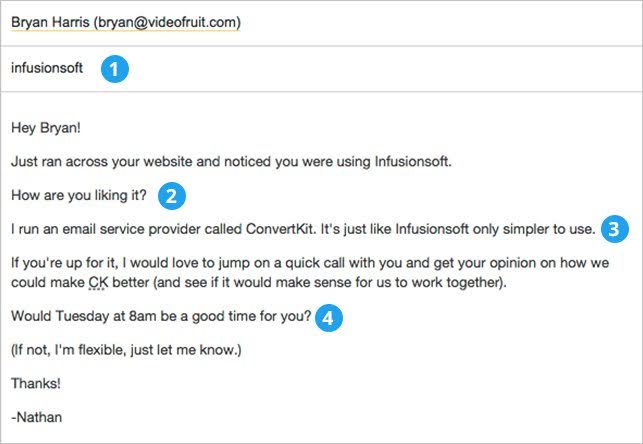
The hard part is creating the email list of prospects, but Bryan’s blog post goes pretty deep into that, so I won’t cover it here.
Instead, I’ll focus on the best parts of the email:
- The subject line is a single word: InfusionSoft. Since Nathan’s list of contacts is targeted (bloggers who use InfusionSoft and might just be tired of its complexity), this one-word subject line will stand out in the prospect’s inbox.
- “How are you liking it?” If you’re a blogger who uses InfusionSoft, Nathan’s willing to bet you probably aren’t overjoyed about using it. This single line is a great way to bring the reader’s attention to the issue, without stating it outright.
- The actual subject line of the email: The alternative to InfusionSoft that’s simpler to use.
- Offering up a specific date and time for a call. It saves several back-and-forth emails when deciding on a meeting time.
What You Can Learn From It
Once again, an effective cold email campaign is simple:Address the customer’s primary pain point.
Tell them how you can solve it.
Then, propose a time for a short meeting where you’ll provide that solution.
Start a Relationship Cold Email
Before I share this PR cold outreach campaign example, if you need to find a PR outreach tool, head over to this article on the best PR tools.The cold email outreach below is a great way to kickstart a relationship with a blogger or journalist.
It references their past work, directs them to something that might interest them (based on their past work), and opens the possibilities for more conversation.
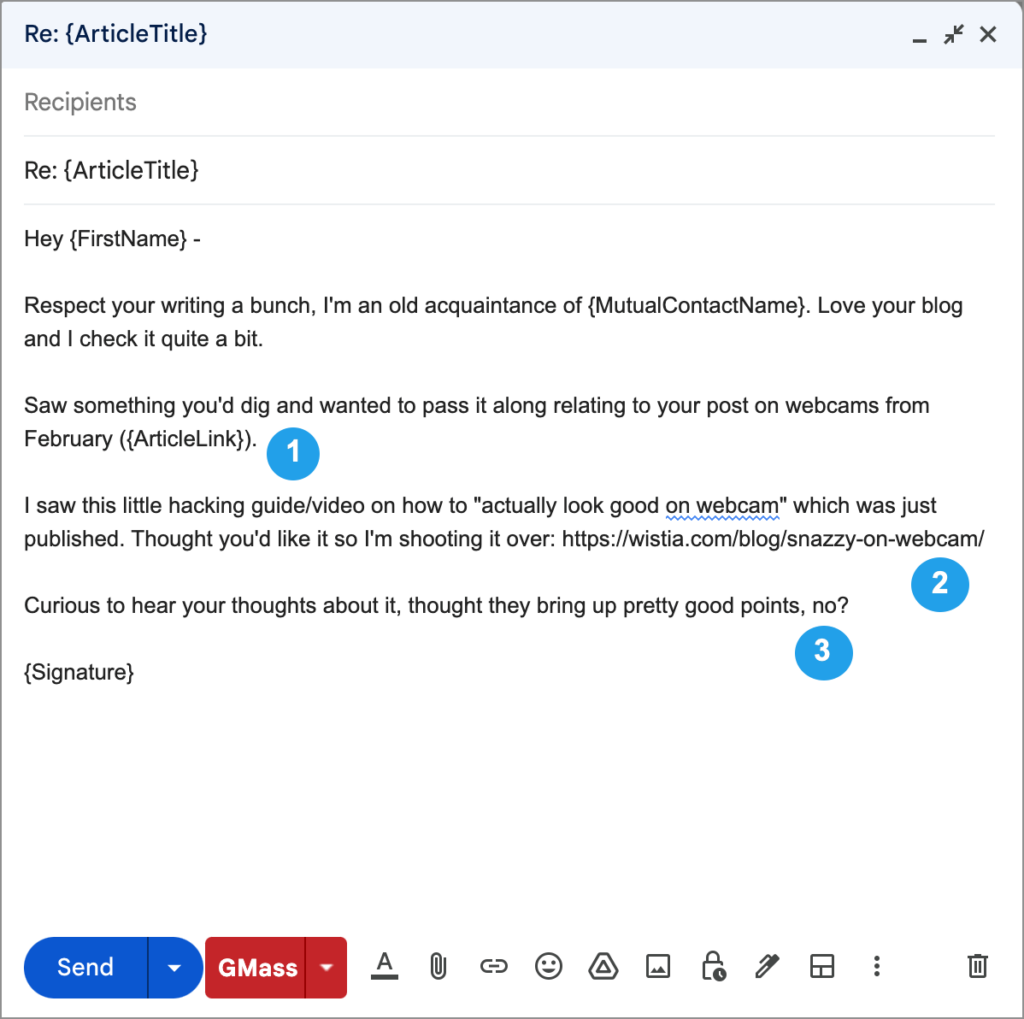
Here’s what I love about it:
- The first paragraph references their recent work, showing the sender is a fan.
- The second paragraph brings the recipient’s attention to a related topic and plugs a related blog post. (Ideally, it’s somebody else’s blog post, since your only objective is to start a relationship — not try to get a link or a reader.)
- The email ends with a question, which opens up the chance for a longer conversation.
What You Can Learn From It
Journalists and bloggers care about their work.By referencing their recent work and directing them to something similar, you show that you care about them and have similar interests.
Over time, this can help you develop a relationship.
Help Someone Out
For a long time, cold email link builders offered their links to “improve an article.” That’s… not true in most cases, and those emails rarely worked. Writers seldom care about adding a semi-related link to a five-year-old article.But writers do care about their typos—a ton.
One of the absolute best ways to start a conversation with a writer is… point out typos and grammatical errors.
You’ll be surprised how effective this can be, especially with writers who take their work seriously.

- Warning! People can be touchy about their grammar. Instead of saying “your grammar is wrong,” be friendly and polite.
- If your email app allows it, you can use conditional formatting here to automatically include up to three typos per journalist. This is a great way to send these emails at scale. (My formatting here is from my cold email app, GMass. I’ll discuss why I use GMass later in this article.)
- Asking what the journalist is working on next is a great way to continue the conversation.
What You Can Learn From It
Provide real value that a journalist cares about, and they’ll appreciate it. Odds are they don’t care about adding a link to your blog post — that serves you, not them, no matter how you try to spin it as “being helpful to their readers.” Pointing out a typo provides value to them.Then build the relationship by asking what they’re working on next.
Use a Hook in a Cold Email
Influencers and writers love nothing more than knowing how their strategies and tactics have helped others.Share your results with them, and they’ll be happy to spread them to their fans and followers.
It establishes a great connection, and it gets them great press!
Here’s a simple template:

- Mentions the recent post, states how you’ve been following it, and how it has affected your life.
- A link to the post and a subtle suggestion that the influencer can share it with their target audience.
What You Can Learn From It
If you’ve ever followed any influencer’s advice, share your results with them.It’s one of the best hooks for building a relationship with them.
Get Published Cold Email
For this example to work, you need two things:- An interesting story
- And a person willing to tell it
For the latter, monitor your Twitter feed or start conversations using some of the templates above to see if any writers, bloggers, or journalists are looking to cover stories similar to yours.
Then, send them this email:

- Mention how you found the story idea — on their blog, email, or public Twitter feed.
- Share the basics of your story in as few words as possible.
- Tell them how this ties into the topic they wanted to write about. It’s best if you can show your story has a beginning, middle, and end — that’s what they’re looking for.
What You Can Learn From It
Writers and journalists love it when they can get a personal, human angle on a story.If you know journalists writing about a topic you have relevant experience with, pitching them stories is a great idea.
Win a Backlink Cold Email
This is one email every marketer has to send sooner or later: a backlink request.Here’s how to do it right…
The first step, of course, is to ensure that you have top-notch content.
Then, find a list of people who link to resources similar to yours, and send this email:
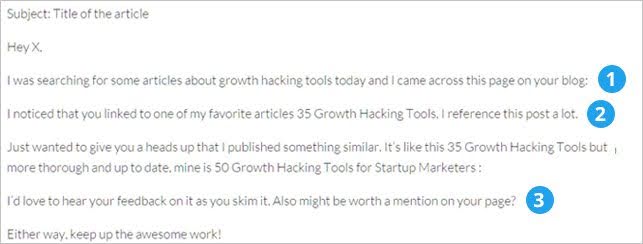
Here’s why this email works:
- Mentions the specific post and how you found it, social proof, search, etc.
- Links to the reference post that you improved on (aka the ‘Skyscraper method’).
- Asks for feedback, then puts a subtle plug for a backlink.
What You Can Learn From It
The best way to get a backlink is to improve an existing resource.Then, ask all those who’ve linked to it to review your improved resource and perhaps give you a backlink in return.
Nail a Sales Call Cold Email
If you’re in B2B sales (say you’re a salesperson or a sales manager) or one of many B2B marketers at your company, you’ll have to make dozens of calls every day.This example sets you up for more yays than nays:

- It asks for just 10 minutes. That’s good enough for most busy people. And what company wouldn’t want 100 more great customers?
- It name drops a close competitor or industry leader, and shows the results they got from working with the sender.
- It’s a very simple three-line email, but if someone credibly promised to get you 100 more customers and asked for just 10 minutes of your time, wouldn’t you be interested too?
What You Can Learn From It
Tell prospects exactly what kind of results they can expect. Then…Tell them how long you’ll take to achieve it!

Cold Email Subject Lines That Work
I included subject lines in the examples above, but here’s an even deeper look into that ever-important element of cold email outreach.Subject line should entice your prospects to open your email. The holy trinity of a good subject line:
- Short (8-10 words max)
- Use a casual tone (prospects do not want to read an email that sounds like it came from their lawyer)
- Not deceptive (if they feel you tricked them into opening, they won’t respond, and it sullies your company’s reputation)
For Initial Introduction Emails
- [Colleague] recommended I get in touch. If you use the “appropriate person” email template shown above, you can mention the name of the colleague who referred you in your subject line.
- A few ideas [to resolve their biggest pain point related to your product]
- 10x [prospect company]’s [area they would want to grow – example: sales, user retention]
- I found you through [Name]. To be able to use this subject line, see what mutual connections you share with this prospect on LinkedIn and mention one of them in the title.
- Congratulations on [recent good event that happened to their company]
- Been following you on [site where they publish content] and wanted to reach out
- Are you the right person to speak with?
- Saw you use [complimentary product] – you may find this interesting
- A new [area that your product is in] strategy for [Company]
For Follow-up Emails
- My brain is an open book for you
- Should I stay or should I go?
- Can you blame me for swinging for the fences 🙂
- Re: subject line of your first email. Only do this for one of your follow-ups.
- Saw that [event relevant to their industry/company or something the prospect recently did]
More Cold Email Resources
I promised you tons of email resources…And I’m not going to back out of that promise!
I’ve covered tons of examples with cold email templates here.
These will help you craft great cold emails of your own.
And don’t forget you can get 15 more templates here, too!
But, if you want even more help writing an amazing email?
Don’t worry, I’ve got you covered!
Here are more go-to resources and related articles for writing effective cold emails:
1. How to Write a Great Email to a Cold Lead
Whether you’re a freelancer, a marketer, or a founder, you’ll have to send emails to cold leads to grow your small business.This link gives an excellent overview of how to write an effective email that can win you deals.
2. How to Write an Email That Doesn’t Suck
93.9% of cold emails suck.This is what Anand Sanwal of CBInsights discovered after analyzing 147 cold emails. Read this post to determine what makes a bad cold email, and how to write a good one.
3. Seven Sanity Checks for Sending Emails Out
You’ll want to read this post before you hit send!4. Quick Tips On How to Write a Subject Line for Sales Emails
The subject line is the most critical part of any cold email. Read this post to get it right the first time!5. 15 Commandments for Every Email Sequence
Read this to learn the 15 rules to follow before sending a cold email. I love the advice about mentioning competitors and mirroring your target’s tone.6. Email Signature Perfection: Should I Buy One or Create One?
This link shows you why email signatures are the most neglected tool in daily communications and how to ensure yours is effective.7. How To Write a Follow-Up Email?
Making first contact is the hardest part. But once you’ve achieved that, what do you do next? This post provides a comprehensive guide to follow-up emails, covering various situations and use cases.So there you go!
Integrating Video Demos for Visual Impact
Video can be your secret weapon in an era where everyone's inbox is flooded with text-heavy pitches. Studies show that adding personalized videos to cold emails can increase response rates by up to 300%. But there's a right and wrong way to do it.When Video Makes Sense (And When It Doesn't)
Use video when:- Explaining complex concepts that need visual demonstration
- Targeting high-value prospects worth the extra effort
- Following up after no response (pattern interrupt)
- Building trust in industries where relationships matter
- Showing personality in creative industries
- Sending high-volume campaigns (not scalable)
- Your message is simple and clear in text
- Targeting traditional industries that prefer formal communication
- You're not comfortable on camera (authenticity matters)
The Anatomy of a Perfect Cold Email Video
Length: 60 seconds maximum- 0-5 seconds: Hook with their name/company
- 5-20 seconds: Show you understand their problem
- 20-45 seconds: Demonstrate your solution
- 45-60 seconds: Clear call to action
- Good lighting (face a window for natural light)
- Clear audio (use headphones with a mic)
- Stable video (no handheld shaking)
- Share your screen to make it about them
- Custom thumbnail that intrigues
Video Script That Converts
Here's a proven script structure:"Hi Sarah, I noticed [specific thing about their business].
[Share screen showing their website/problem]
I wanted to quickly show you how we helped [similar company] solve this exact issue...
[Show brief demonstration or result]
If this looks interesting, would you be open to a 15-minute call to discuss how we could do the same for you?
Just reply to this email and I'll send over some times."
Tools for Video Cold Emails
For Quick Personal Videos:- Loom: One-click recording, easy sharing
- Vidyard: Advanced analytics, see who watched
- BombBomb: Email-specific features
- Sendspark: Merge tags for personalization at scale
- Hippo Video: Templates and workflows
- Dubb: CRM integrations
Making Video Work at Scale
You don't need to record unique videos for everyone:- Create a base video covering your core value prop (45 seconds)
- Record personalized intros (10-15 seconds each)
- Use merge tags to auto-personalize thumbnails
- Create templates for common use cases
Video Email Best Practices
Do:- Start with their name visible on screen
- Keep energy high but authentic
- Show their website/product
- Include captions for silent viewing
- Test your video on mobile
- Make it about you
- Use generic scripts
- Forget to include text context
- Send video-only emails
- Skip the CTA
Combining Cold Emails with LinkedIn Follow-Ups
The days of single-channel outreach are over. The most successful B2B campaigns in 2025 combine email with LinkedIn for a multi-touch approach that can double your response rates.Why Multi-Channel Outreach Dominates
The Statistics:- Single-channel: 3% response rate
- Multi-channel: 9% response rate
- Email + LinkedIn + Phone: 15% response rate
- Different people prefer different channels
- Multiple touchpoints build familiarity
- Social proof from LinkedIn profiles
- Shows genuine interest and persistence
The Perfect Email + LinkedIn Sequence
Day 1: LinkedIn Profile View- View their profile (they get notified)
- No connection request yet
"Hi [Name], I noticed we're both [commonality - industry/interest/connection].
I've been following [their company]'s work in [specific area]. Would love to connect!"
Day 3: Connection Accepted - Thank You
"Thanks for connecting, [Name]! I've been impressed by [specific thing about their work].
Looking forward to staying in touch and learning from your insights on [topic]."
Day 5: Send Cold Email
- Reference LinkedIn connection
- Provide a value proposition
- Include social proof
"Hi [Name], I sent you an email a couple days ago about [specific topic].
Thought it might be easier to chat here. [One-line value prop]. Worth a quick discussion?"
Day 10: Final Email Follow-Up
- Different angle
- Provide new value
- Last attempt acknowledgment
"Hi [Name], I'll stop bugging you after this :)
Just wanted to make sure you saw my note about [specific value].
If not interested, no worries at all. Either way, glad we're connected!"
Advanced Multi-Channel Tactics
The Triple Touch:- Email in the morning
- LinkedIn at lunch
- Call in the afternoon (All same day for urgency)
- Engage with their LinkedIn content
- Send a connection request mentioning their post
- Email referencing their content + your insights
- LinkedIn message continuing conversation
- Find a mutual connection
- Engage with mutual's content
- Ask for an introduction
- Follow up with direct outreach
Cold Email Software: How to Choose Your Platform
I’ve tried lots of different cold email software platforms. The one I now use exclusively for all my cold emails is GMass.
Here’s their list of reasons why GMass is different from the other cold email platforms, but here are my reasons for choosing it:
- It works inside Gmail and fits into my email workflow. I’m not sending campaigns from a different website and replying in Gmail; it’s all happening there.
- GMass has the best email deliverability of any platform I’ve used. Their emails go through Gmail’s servers, and they have a bunch of email deliverability tools, like a free email warmup and a tool that predicts whether your campaign is destined for the spam folder (and how to fix it).
- Gmass does the best job of making mass emails feel like personal emails, which results in a higher reply rate. GMass’s mail merge features are great, and they have lots of little extra features, too. I like that they allow you to send follow-ups as plain text replies to your previous emails to a contact.
- And they have the best pricing of any cold email service, plus a great free plan.
Bonus: Cold Email Pro Tips!
- Use a note-taking app such as Notion or Monday to keep track of your cold email financial performance—that is, how much you spent on the campaign and how much you made. It’s important to focus on opens and clicks and know how you’re doing financially.
- Create a separate email address on a separate domain similar to yours to send your cold email campaigns and use cold email software to scale your cold outreach campaign. (For instance, if your primary domain is a .com, get the .net to send emails.)
- 2. If you can easily find this data point on your prospects, separate them into lists based on their time zones.
Without accounting for time zones, they may receive your cold email at dinner time or, worse, in the middle of the night and miss it entirely.
- 3. Make it easy for anyone to schedule a call with you in one click.

- When setting up your first cold email campaign, it helps to write unique emails to your first 10 or so prospects.
Based on the open and response rates of your different approaches, you will see which subject lines work, which calls to action get the most clicks, and when it’s best to send the emails.
You can A/B test with GMass or most of the other cold email platforms.
- In the last 2-3 emails of your sequence, you could offer a way for prospects to opt out of your emails to avoid annoying those who aren’t interested.
Even better? You can use a line like:
No longer interested in hearing from me? Let me know.
Then, when the person replies to unsubscribe, it shows email clients like Gmail and Outlook that someone replied to/engaged with you. That can boost your sender's reputation; you might as well get a little good out of the bad news of an unsubscribe.
—
And that’s a wrap! I've used these cold email templates and tactics for over eight years, and now I want you to do the same!
As always, give me a shout if you have any questions or comments!
Is Cold Email Spam? A Clear Distinction
Is Cold Email Spam? A common question is: "How is cold email different from spam?" The line can seem blurry, but the distinction is crucial for both effectiveness and legality. While both are unsolicited, a legitimate cold email is a targeted, professional tool for starting a conversation, whereas spam is an irrelevant, often deceptive, mass message.Here’s a clear breakdown of the key differences:
Spam Is...
- Impersonal and Generic: Sent to a massive, untargeted list with no personalization beyond a
[First Name]tag. The message is identical for everyone. - Deceptive: Often uses misleading subject lines, fake sender names, and unclear intentions to trick people into opening or clicking.
- Untargeted: The sender has done no research on the recipient. The offer is irrelevant to the recipient's role, company, or needs.
- Focused on a Hard Sell: Aims for an immediate purchase or action without building any rapport or providing upfront value.
- Difficult to Unsubscribe From: Lacks clear contact information or a working unsubscribe link, violating laws like CAN-SPAM.
- Highly Targeted and Researched: Sent to a specific individual who has been identified as someone who could genuinely benefit from the solution. The sender understands the recipient's role, company, and potential pain points.
- Personalized and Relevant: The email demonstrates genuine research. It might reference a recent company achievement, a shared connection, or a specific challenge the recipient's company is facing.
- Value-Oriented: The primary goal is to start a conversation by offering value upfront. This could be a helpful insight, a solution to a problem, or a valuable resource.
- Transparent and Professional: The sender uses their real name, company, and provides legitimate contact information. The intention is clear and professional.
- Focused on Conversation: The call-to-action is typically soft, like asking for a brief chat to share more information, rather than demanding a sale.
Here is a great example, a few days ago, I received this email, Can you see all the telltale signs of an email destined for the spam folder?
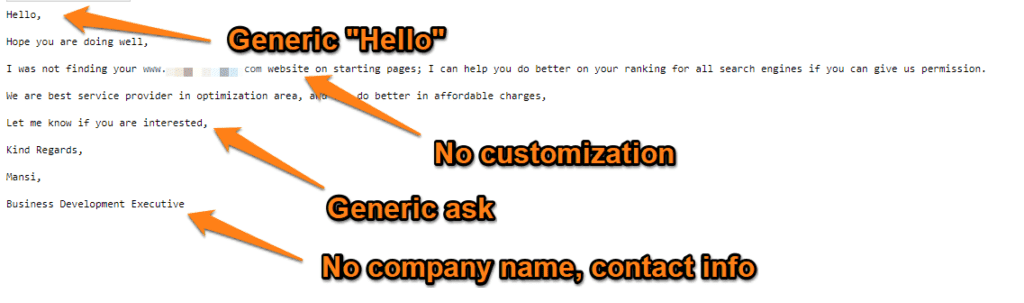
This email doesn’t address me by name, and it’s not customized.
Did you notice that it doesn’t have a specific request? It’s just a generic, “Let me know if you’re interested.”
Also: There’s no contact information!!!! I have no idea who the senders are, or what they represent …
You can see why a spam filter will filter this out to a spam folder.
But even if it doesn’t wind up in my spam folder, I’m certainly not going to take action based on this email.
With all the SEO experts, firms, and workers in the world, will I respond to this impersonal, vague, untrustworthy email? There's no chance.
Compare that example with another email:
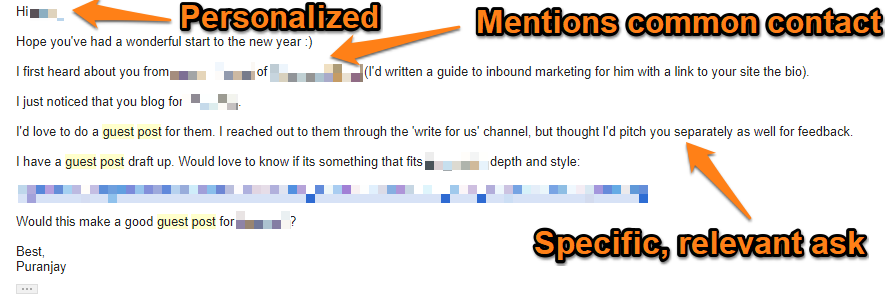
Can you see the difference?
This good cold email does three things:
- It addresses the recipient directly.
- It has a highly specific and relevant request.
- And it mentions a common contact.
The ideal cold email outreach is not trying to push a product or get anyone on the phone for a long conversation.
The real-world equivalent of this email would be like saying, “Hi,” to a friend of a friend you bumped into at a conference.
It’s not pushy.
It’s not annoying.
And it’s perfectly reasonable, as long as your call to action isn’t overly aggressive.
For example: “Buy my product!”
Sounds pushy, right?
But if you say: “Let’s get coffee sometime!”
That sounds a lot better.
Want a “sniff test” for spam vs. cold email?
Before you send out a cold outreach email, ask yourself:
Would I be comfortable saying this to someone I met at a conference for the first time?
If the answer is no, then it’s likely spam. If the answer is yes, then it’s a cold email.
Keep in mind that spam is illegal. Send too much spam and you will run afoul of CAN-SPAM laws in the U.S. (and similar laws in other jurisdictions).
Cold Email vs. Unsolicited Email
Unsolicited Commercial Email (UCE) is the official term used by the FTC for spam.UCE can range from a sales email (like the example above) to a newsletter from a company you’ve never heard of.
If you don’t want to break the law, you should know:
If you didn’t explicitly gain recipients’ permission to receive marketing emails with an opt-in form, and your email meets the spam criteria above, that email is an unsolicited commercial email (UCE).
Now… technically, cold email outreach is unsolicited as well.
However, if cold emails have:
- Appropriate header information
- Personalization
- And the offer of a relevant, targeted value proposition
Don’t Break the Law with Cold Emailing
Are you clear about whether an email falls under the CAN-SPAM laws?It can be tricky. So let me break it down:
As per the Federal Trade Commission (FTC), all sales emails may contain three types of information:
- Commercial content, marketing emails selling a product, or promoting a sale.
- Relationship or transactional content, like a bank sending a customer their bank statement, an eCommerce store sharing shipping updates, or a blogger sending a message to their list of opt-in subscribers.
- Other content can range from personal to mixed (relationship + commercial) content.
A well-crafted cold email marketing message might have a commercial tilt but also offers significant value.
How to Cold Email & Not Send Spam
Many organizations and people use some sort of identity theft protection and monitoring (such as Aura, Norton, Malwarebytes, or their many alternatives). It is easy for anyone to manually mark unsolicited emails as “spam.” In many cases, the software does this automatically.Once the software designates your email as spam (or someone marks it manually), you’ll be added to a blacklist and have lots more email deliverability problems.
This software is designed to intercept emails like these below and make sure they go to spam:
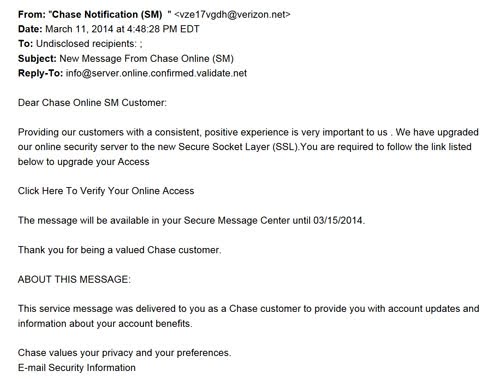
Here is another gem:
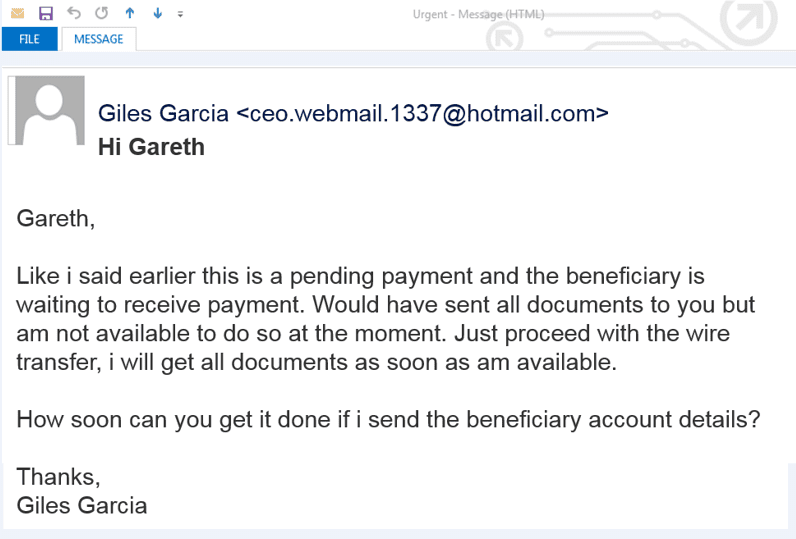
You can check if you are already on a blacklist by using the MXToolbox tool here.
You do NOT want to have your cold emails classified as spam and have your emails reside in the spam folder while your domain is on a blacklist.
The more of these best practices you follow, the less likely your email will be seen as spam.
Here are some quick tips to follow:
1. Use Your Real Name and Real Email Address
The “from field” tells the recipient where the email is coming from.This is bad:
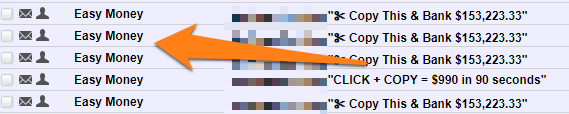
Always use your name and personal email address. This shows that you are a real person, not a random small business sending unsolicited spam. I recently wrote a great guide on how to find anyone’s email address in under 30 seconds, where I delve into email headers, the recipient’s name, and so forth.
2. Use the Recipient’s First Name
This is the easiest way to show that you didn’t just find a list of sales emails and spam them – use their first name.A Hi {First Name} goes a long way towards making you sound more authentic.
However… there’s much more to personalization than merely including someone’s first name. And that’s where this next step comes in…
3. Make It Relevant to the Recipient
What’s one of the biggest indicators of spam emails?They’re irrelevant.
Spam emails seldom address the specific needs of the recipient. It’s the same message to everyone, regardless of their needs, requirements, or pain points.
Always ensure that your email offers at least one relevant or valuable item. Not only does that transform your email from “spam” to “cold email,” but it also greatly improves your chances of a response.
4. Don’t Talk About Yourself Too Much
Know how to write a great intro?Keep it short.
A long intro makes your email harder to read.
You don’t have to tell them you are “John Doe from Acme Industries, the leading manufacturer of comically oversized gadgets for wily coyotes.”
Your cold email should focus on the recipient and their needs. When you talk about yourself, it should only be in the context of how you can help them (e.g., social proof, your track record, your results with similar businesses).
5. Match the Subject Line with the Email Body
Have you seen these subject lines in your spam folder:“Heard rumors about you”
“Dear friend”
“Urgent! Please read!”
Avoid these at all costs.
Writing a great subject line is simple, just keep in mind:
Subject lines are meant to tell recipients exactly what they’re going to get in the email body.
6. Don’t Use Obviously Copy-Pasted Text
Want to get sent straight to the spam folder?Modern email clients preserve formatting when you copy-paste from one document to another.
See for yourself:
Try copy-pasting the last sentence to a new Gmail message.
If you have copy-pasted text because of formatting, the recipients will be able to spot it from a mile away.
7. Add Your Contact Info to the Signature
Name, job title, and phone numbers are the bare minimum you should have in your signature. If you can add a photograph or social media links, that’s great too. A physical address is also excellent for credibility and avoiding falling on the wrong side of CAN-SPAM.Basically?
Show the recipient that you are a real person!
8. Track Your Emails
What is your open rate? Click-through rate? Reply rate?Are you getting lower rates than you should on your campaigns?
It’s a sign that your copy or value proposition isn’t any good.
Track your email performance, then:
Fine-tune to improve delivery.
Cold Calling Doesn’t Work!
According to Zendesk, only 28% of cold calls are answered, and another 55% go unanswered.Given how labor intensive they are and how many rejections you have to endure to get one “yes,” it’s not surprising that fewer and fewer salespeople are making calls.
Cold emailing is a much more effective way to put yourself in front of prospects and nurture them into customers.
Here’s why cold emailing is a whole new ballgame.
The 7 Universal Objections (And How to Crush Them)
- "We don't have a budget."
"I know budgets are tight (especially in Q4). That's why we offer a performance-based model
where you only pay after seeing results. Client X saw 3x ROI within 60 days."
Alternative Approach:
"Before you worry about cost—most clients save $X within 30 days just from [specific efficiency].
The solution typically pays for itself by month 2."
- "We're happy with our current solution."
"You might already be using [likely competitor]. Great choice!
We actually complement what they do by [specific differentiation].
Client Y uses both and sees 40% better results."
Alternative Approach:
"I'm sure you have something in place for [problem]—most successful companies do.
But if you're like our other clients, you're probably still struggling with [specific gap current solution doesn't address]."
- "Not the right time"
"I know Q4 is crazy. That's exactly why I'm reaching out now— so you can hit the ground running in January.
Implementation takes just 2 weeks, and you'll see results by February."
Alternative Approach:
"Timing is everything. That's why we built our solution to integrate in under 48 hours with zero downtime. You can start seeing value while barely lifting a finger."
- "I need to check with my team/boss."
"I'd be happy to create a one-page executive summary you can share with your team. Or if easier, I can jump on a quick call with all stakeholders to answer questions directly."
Alternative Approach:
"I've prepared a 3-minute video demo you can forward to your team. It covers ROI, implementation, and addresses the usual concerns. Want me to send it over?"
- "We don't have time to implement."
"Implementation horror stories are real—that's why we handle 95% of setup for you. Your team just needs 2 hours total over 2 weeks. Client Z called it the 'easiest implementation they've ever done.'"
- "How do I know this will work for us?"
"Fair question. That's why we offer a 30-day pilot program.
You'll see real results with your actual data before making any long-term commitment.
Zero risk, all upside."
- "We're too small/big for this"
"We work with companies from 10 to 10,000 employees. The beauty is our solution scales with you.
[Similar-sized company] saw [specific result] within [timeframe]."
Advanced Objection Handling Techniques
The Acknowledgment Pattern: "I know you're probably thinking [objection]. That's exactly what [client] said before they saw [result]."The Reframe Method: "This isn't about [what they think it is]. It's about [what it really is]."
The Story Flip: "Funny story—[respected company] said the exact same thing. Fast forward 6 months..."
The Options Play: "We have three ways to work together: [budget-friendly option], [standard option], [premium option]. Something for every situation."
Industry-Specific Objections
SaaS to Enterprise: "I know enterprise moves slowly. We've built in SOC2 compliance, SSO, and dedicated support from day one."Agencies: "Your clients' needs are unique. Our white-label solution lets you customize everything while we handle the heavy lifting."
E-commerce: "Integration nightmares are real. We work with Shopify/WooCommerce/BigCommerce out of the box. 15-minute setup."
Healthcare: "HIPAA compliance isn't optional. We're certified, audited annually, and used by 40+ healthcare organizations."
Psychology of Preemptive Objection Handling
Why It Works:- Shows you understand their world
- Removes mental barriers to saying yes
- Demonstrates confidence in your solution
- Makes you appear honest and transparent
- Shifts focus from problems to possibilities
- Read their reviews of competitors
- Check their job postings for pain points
- Look at their investor updates
- Monitor their social media complaints
- Ask current clients about initial concerns
Cold Emailing is Scalable
Sales prospecting takes a lot of time and concerted effort, from researching leads to tracking their contact info. And then… it’s time to get in touch.But you can only call one person at one time. With email, you can use outreach automation tools to create automated cold email sequences and nurture hundreds of prospects at once.
The other limit of cold calling is that you have to catch a decision-maker at the right time. They rarely return voicemails.
With email, you can stay on the first page of your prospect’s inbox for at least three to five hours, increasing your chance of getting noticed and opened.
How to send an automated cold email sequence to convert the maximum number of prospects into customers
In an effective cold email drip campaign or drip sequence, you write four to six emails ahead of time, leaving a few words and phrases to be personalized for each cold prospect, such as their name, where you found them, and what industry they work in.
Remember to write each email based on the potential customer’s perspective!
Be specific about how you can help your cold prospect solve a big problem for them.
You may already know this, but it’s easy to get stuck inside your own perspective as soon as you start typing.
For example, if you say, “My tool can help you rapidly build a targeted leads list.”
Then, you’re describing a feature instead of a benefit, and it’s from your perspective.
But, if you say, for example:
“Never worry about running out of new sales opportunities …”
Then, you’re describing specific benefits and how they can solve problems from your customer’s perspective.
Using an outreach automation tool like GMass (my tool of choice), you can connect to a Google Sheet of contacts, add emails in your sequence, and set up a schedule to send them.
Your email sequence and schedule can go something like:
1st day: Introduction email
Keep it short and sweet. Introduce yourself, mention how you found them (LinkedIn, their recent blog post, etc.), and hint at how you can help solve a specific problem they're facing. End with a soft call-to-action like "Would you be open to a quick chat?"3rd day: Follow-up email
Reference your first email briefly and provide social proof. Share a quick case study or specific result you achieved for a similar company. Keep it under 100 words and ask if they'd like to learn more.
7th day: Value-add email
Share something genuinely helpful - a free resource, industry insight, or relevant article. Don't pitch your service directly. Simply provide value and mention you're available if they want to discuss their challenges.
10th day: Break-up email
Use the "breakup" strategy to create urgency. Say something like "I haven't heard back, so I'm assuming this isn't a priority right now. I'll close your file for now, but feel free to reach out if things change."
Pro tip: Personalization at scale is key. Use merge tags not just for names and companies, but for industry-specific pain points, recent company news, or mutual connections. The more relevant your email feels, the higher your response rates.
Testing and Optimization
Your cold email campaign isn't set-it-and-forget-it. Track these metrics:
- Open rates (aim for 30-50%)
- Reply rates (target 10-20%)
- Meeting booked rates (shoot for 3-7%)
- Sending emails too frequently (respect the inbox)
- Making it all about you and your product
- Using generic templates without customization
- Forgetting to clean your email list regularly
- Not having a clear next step in each email
Your Cold Email Success Starts Now
Cold emailing works for those who do it right. As I've shown you through my journey (building four SaaS businesses, landing interviews on 70+ podcasts, and forging relationships with industry titans like Gary Vaynerchuk), cold email remains one of the most powerful tools in your business arsenal.But here's the truth: The game has changed. AI-generated spam is rampant, making authenticity and personalization more critical than ever. The bar is higher, but so are the rewards for those who clear it. So, what do you need to do?
- Target with Precision: Use tools like TheirStack and Clay to find prospects who actually need what you offer. Remember: A perfectly crafted email to the wrong person is still a waste.
- Personalize at Scale: Show you've done your homework. Reference their recent work, mention specific pain points, and demonstrate a genuine understanding of their challenges. This is what separates you from the AI-generated noise.
- Lead with Value: Whether it's Bryan Harris's custom demos or video walkthroughs, give before you ask. The most successful cold emailers are those who provide immediate, tangible value.
- Master the Multi-Touch Approach: Email alone isn't enough anymore. Combine it with LinkedIn outreach, video messages, and strategic follow-ups. Your persistence should be helpful, not annoying.
- Test, Track, and Optimize: What works for one industry might fail in another. Track your metrics religiously—open rates, reply rates, meeting booked rates—and iterate based on data, not assumptions.
- Never use your primary domain for cold outreach
- Warm up your email accounts for 21 days minimum
- Keep subject lines short, personal, and honest
- Focus on benefits, not features
- Make every follow-up add new value
- Respect the inbox—quality over quantity always wins
Your Next Steps:
- Choose your weapon: Set up GMass or your preferred cold email tool
- Build your list: Use TheirStack to find companies using complementary tools
- Craft your campaign: Start with 10 highly personalized emails to test your approach
- Track everything: Monitor what works and double down on success
- Scale wisely: Once you find what works, automate and personalize.
Every "no" teaches you something. Every non-response refines your approach. And every "yes" validates that when done right, cold email isn't just effective; it's transformative.
I've built my entire career on cold email, and in an age of AI and automation, the opportunity for those who do it right has never been greater. The prospects who need your solution are out there, waiting. You now have everything you need to reach them.
So what are you waiting for? Your next customer, partner, or life-changing opportunity is just one well-crafted cold email away.
Now stop reading and start sending. The inbox awaits.
Frequently Asked Questions
What's the Biggest Difference Between Effective Cold Emails and Spam?
Effective cold emails are research-driven, personally relevant, and provide immediate value to the recipient. They reference specific details about the prospect's business, recent work, or industry challenges. Spam, by contrast, is generic, deceptive, uses fake contact information, and focuses purely on the sender's needs rather than solving the recipient's problems.How Many Follow-Ups Should I Send, and What's the Best Timing?
Send 3-4 follow-ups spaced 3-7 days apart, with most responses typically coming from the final follow-up. The sequence should be: Day 1 (introduction), Day 3-4 (social proof), Day 7 (value-add content), and Day 10 (polite break-up email). Each follow-up should add new value or take a different angle rather than simply repeating the same message.Should I Include Links in My Cold Emails, and How Do I Handle Redirects?
Never include links directly in cold emails as they trigger spam filters and look suspicious. Instead, buy similar domains to your main one (e.g., if you own company.com, get companyhq.com) and set up redirects. When recipients copy-paste your domain to verify legitimacy, they'll land exactly where you want them without clicking a link.What Metrics Should I Track to Measure Cold Email Success?
Focus on three key metrics: open rates (aim for 30-50%), reply rates (target 10-20%), and meeting booked rates (shoot for 3-7%). Also track deliverability metrics to ensure emails reach inboxes, and measure customer lifetime value from cold email leads, which often exceeds other channels due to the high-intent nature of respondents.P.S. Remember what I said at the beginning: 93.9% of cold emails suck. With everything you've learned in this guide, you're now equipped to be in the 6.1% that doesn't. Make every email count.
Get the full playbook in your inbox.
20,000+ founders read my newsletter on building to acquisition in 3 years, working 3 hours a day.
