Business professionals send and receive 121 emails per day on average (Radicati Group, 2024), meaning most emails receive 3–5 seconds of attention before a decision is made. The most effective business emails share three traits: a clear subject line under 50 characters, a specific ask in the first sentence, and a single CTA rather than multiple options.
These 27 templates are drawn from real campaigns across PR, sales, partnerships, and client communication — each one tested and optimized for response rate rather than theoretical best practices.
Subject: Your follow-up meeting tomorrow - Open rate: 67%
Subject: Meeting tomorrow - Open rate: 23%
Same email. Different subject line. 44% difference in opens.
That's the power of getting business emails right. One word can mean the difference between a closed deal and a missed opportunity.
Most professionals write emails like they're checking a box—generic, forgettable, and buried in overflowing inboxes. But the emails that get results? They're strategic, specific, and impossible to ignore.
Below you'll find 27 tried-and-tested email templates that consistently drive opens, clicks, and conversions. Each is designed for a specific situation, be it client outreach, internal communications, or sales follow-ups.
Before you dive into the templates, make sure you have these essentials covered:
✓ Email tracking tool (to measure open and response rates) ✓ Dedicated business email address (avoid personal Gmail) ✓ Mobile-optimized email format ✓ Clear conversion goal for each email ✓ Dedicated landing pages with testimonials ✓ Follow-up sequence planned ✓ Segmented contact lists (exclude existing customers from cold outreach)
Ready to write emails that actually get read? Here are the templates that make it happen:
Let’s dive in!
Key Takeaways
- Personalization is your superpower. Generic emails get ignored, but emails that show real research into someone’s goals and pain points get replies.
- Purpose beats polish. Every email should push the relationship forward with a clear, actionable next step—otherwise, why send it?
- Not all relationships are equal. Cold leads, warm prospects, and fading contacts need different email strategies..
- Think mobile first. With half of all emails read on phones, walls of text kill deals. Short, scannable, mobile-friendly messages win.
- Test, track, tweak. Open rates are vanity. The pros measure replies, conversions, and revenue impact—then refine until their emails print results.
Business Email Examples for Customer Outreach
When reaching out to customers for the first time, your business email needs to strike the perfect balance between professionalism and personality.The examples in this section showcase how successful companies initiate meaningful conversations with potential clients. These templates demonstrate the art of making a strong first impression while communicating value and building trust from the first interaction.
Statista’s Thoughtful Customer-Centric Email
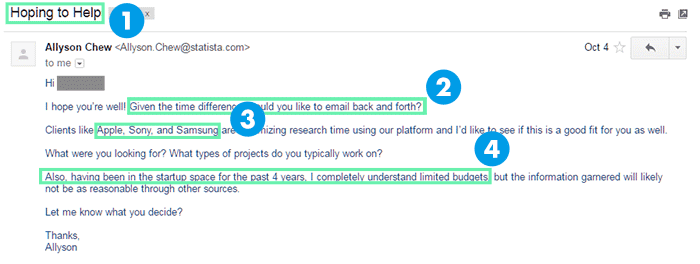
I recently received this email from Statista after I’d signed up for their free account.
This message was my first contact with Statista. They’d never spoken to me before and had no information about me besides what I’d shared when I signed up with them.
Here’s why this example knocks it out of the park:
- The subject line “hopes to help”: This sets the tone for the rest of the email. Statista doesn’t focus on winning a deal. It focuses on helping you make better use of its tools. It’s a subtle way of selling themselves, which I’m on board with 100%.
- They mention a “time difference.” Statista is based in Hamburg, Germany. They’re 9 hours ahead of the U.S. Eastern time zone. So when Allyson asked if I prefer communicating over email, she was being thoughtful. There’s no back and forth about setting up a call at an awkward time.
- Social proof: I won’t buy a service because a big-name brand already uses it. But knowing that Apple trusts Statista gives me confidence in them.
- Budgetary concerns: As a small business owner, I’m often wary of emailing similar companies without transparent pricing. But Allyson proves she empathizes with me by suggesting that Statista will have a solution that fits my budget.
The Benefit-Focused Follow-Up Business Email Template
The biggest mistake you can make with follow-up messages is to leave your prospect in the dark.If you’re simply saying “Just following up,” you’re basically bumping the email back to the prospect’s inbox. If they didn’t have enough reason to reply earlier, simply bumping the email back won’t strengthen your case.
That’s why I love this example from Avidian. It shows exactly how to work new information into a message thread.
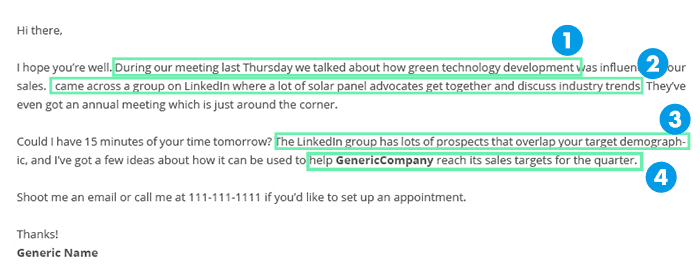
Here’s what I like:
- It starts with a reminder. Decision makers tend to be busy. Chances are, they won’t remember who you are or why you emailed them. If you’re emailing after a long time, it’s a good idea to remind them of your last conversation and its context.
- New information: This template steers the conversation to new information and its relevance to the original conversation (in this case, a LinkedIn group).
- Reason for the email: This is a continuation of the above – why this new information matters.
- Benefit: Closing with a benefit works well. Closing with an urgent benefit – “reach sales targets for the quarter” – proves even better. After all, if you’re the VP of sales at a startup, wouldn’t you want to meet your sales targets as early as possible?
- Subject line: Even though it’s not present in this template, it’s the most critical part of your email. Keep it to 60 characters and make it punchy. For more ideas, check out my guide with 100+ examples of an email subject line.
Lead Tracking and Warm Lead Business Email Examples
Converting website visitors and warm leads into customers requires a sophisticated approach beyond generic outreach. The business email examples in this section reveal proven strategies for engaging prospects who have already shown interest in your products or services.From leveraging visitor tracking data to nurturing downloaded content leads, these templates help you create personalized touchpoints that move prospects closer to a purchase decision.
The Lead Tracking Follow-Up
If you can connect visitors to businesses using tools like WhoIsVisiting or HubSpot’s prospect tracking, you can get pretty creative with your messages.For one, knowing that someone from your target company is visiting your site can be a great icebreaker.
Here’s a template for using this trigger:

This one is pretty basic in its actual content, but it hits all the right marks:
- Tell the lead what her teammates were doing: This might seem a bit stalkerish, but the right way to send such an email is to tell your reader upfront what pages the teammates were viewing. Businesses understand that prospects are often tracked, so it won’t surprise them.
- Invite teammates to join the call: While the “10 minutes to discuss” is standard, inviting others to the discussion makes this closing line more effective.
Following Up on a Warm Lead
Imagine this: A gentleman downloaded an eBook from your site last week using his name, email address, and website.After researching this information, you realized he’s a perfect fit for your services.
What should you say to him?
Here’s a template courtesy of Attach.io:

- Clever subject line: “Lofting” is a rare enough word that it will stand out in any inbox. “Let’s get you lofting” isn’t very benefits-focused, but it’s smart. And that’s usually enough to get an email opened.
- Simple Introduction: Since you recently captured the lead, there’s a good chance the prospect still remembers your brand name. Instead of a long-winded introductory email, simply stating your name and your company is enough.
- Simple personalization: Personalization is critical, but complicating it significantly reduces your email velocity. This one focuses on a single variable (“your lead generation at [company name]”), making personalization faster.
- Exact days/times: Instead of going back and forth to decide on a time/day, it’s sometimes better to propose a date and let the prospect propose the right time for a call.
Emailing a Referred Lead
As any seasoned salesperson will tell you, referral leads are worth their weight in gold. Knowing a common connection makes getting the foot in the door much easier and eases customer FUDs (fear, uncertainty, and doubt).But how exactly do you email a referred lead?
Here’s a template (credit: HubSpot):
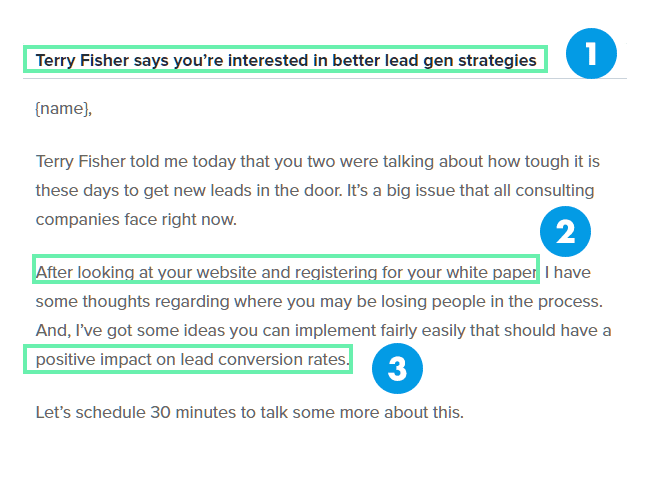
Here’s what to love about this:
- Referral name in subject line: You want your subject line to grab the prospect’s attention. Mentioning someone the prospect knows is a powerful way to do that.
- Show that you’ve done your research: This line shows that you’ve done your homework. Important to show that you’re not just blindly emailing people.
- Close with a benefit: The business email template concludes by asserting that it has ideas you can “implement fairly easily” that will have a measurable impact on an important metric: lead conversion rates.
Sales is a game of months, not days. For high-value prospects, you can expect to go back and forth over weeks on end.
During this time, you want to a) keep establishing common ground, and b) keep prospects interested by sharing relevant content.
Use this template from HubSpot to see how it’s done:

- References a shared experience: One way to establish common ground quickly is to mention an event or experience you both attended. This shows that you share the same interests and goals.
- Mention business goal: Sales emails aren’t meant to be chit-chat. After establishing a connection, circle back to why you’re emailing them: because your service/product can help them meet their goals.
- Deliver relevant content: This is the objective of this business email template. Using phrases like “As promised” is a good way to make it sound more natural.
- Subject line: Again, do not forget to focus on the subject line before writing your email.
Post-Meeting Business Email Examples
The conversation doesn't end when the meeting does. In fact, what happens after a meeting often determines whether a deal moves forward or stalls. These business email examples demonstrate how to maintain momentum after phone calls, video conferences, or in-person meetings.You'll learn how to recap key points, address concerns that arose during the discussion, and guide prospects toward the next steps in your sales process.
Follow Up After a Phone Call
A good sales practice is to always follow up phone calls with an email reiterating the points you discussed in the call. This is a good way to keep track of the conversation and gives you a chance to send over any relevant documents or data.Here’s a business email template you can use to do this:

- Start by referencing the phone call: This is a generic greeting, but it’s personalized enough to work. Your job is to quickly mention the phone call and the context of your conversation before getting to the meat of your email.
- Focus on “personal impact”: Remember, the people you are dealing with also want to advance their careers. If your solutions can help them solve personal issues, you’ll have a better chance of getting their attention.
- Send additional data: If you discussed any content, data, or documents in the phone call, the second paragraph is a good place to mention them.
- Mention date and time for next meeting: Instead of wasting time trying to find a suitable time, go ahead and mention the schedule that works best for you. If the prospect has any issues, she can easily get you to change it.
Break-Up Business Email Examples That Convert
Sometimes the most powerful email you can send is the one that says goodbye. Break-up emails create urgency and often generate responses from prospects who've gone silent.These business email examples show you how to craft compelling final messages that reignite conversations or help you move on to more promising opportunities. Learn the psychology behind why these emails work and how to use humor and directness to your advantage.
“Breaking Up” with a Prospect
Most of your leads won’t turn into sales.And that’s okay.
Some leads won’t buy because they’re either uninterested or can’t afford your product.
Many leads, however, are interested in your products but don’t have the time to commit to a purchase right now.
Instead of fading off the radar for such leads, send them a “break-up” email telling them you won’t be mailing them anymore.
Here’s the template (credit: Attach.io):
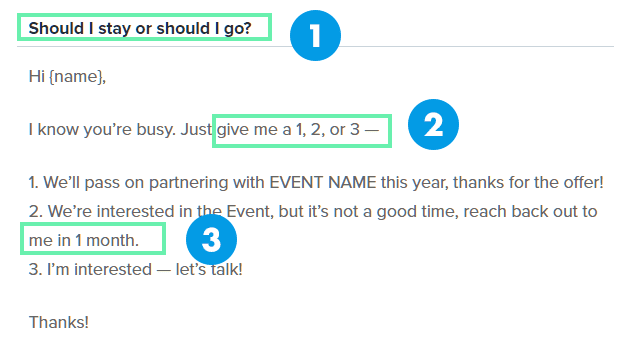
This business email template gets everything right:
- Clever subject line: This will stand out in the prospect’s inbox (and probably earn you a nice chuckle). Plus, the song is perfectly relevant here.
- Make it easy for prospects to respond: Instead of writing a lengthy reason for the radio silence (or worse, no reply), give prospects an out by giving them pre-written response templates. Replying to this email will take a lead literally 10 seconds or less.
- Establish a timeline to restart the sales process: Notice how this email gives prospects a way to restart the sales process in one month. This catches all prospects interested in your product but unable to commit right now.
The Humorous “Break-Up” Business Email Template
If you can make it work, humour is one of the most powerful sales weapons. If your brand personality or the rest of your conversations have a humorous lilt to them, here’s a compelling sales template you can use:
- “Are you okay”?: This subject line is designed to do one thing: get opened. Sure, it’s a little misleading, but be honest: wouldn’t you also open an email like this?
- Simple but practical joke: As far as humor goes, this is safe and works in context.
- Give prospects an easy way to respond: Similar to the above break-up email, prospects just have to say (1), (2) or (3) to indicate their preference.
Relationship Building Business Email Examples
Building lasting business relationships requires more than transactional exchanges. It demands genuine engagement and value-driven communication. These examples illustrate how to nurture professional relationships through congratulatory messages, valuable content sharing, and strategic introductions.These templates help you stay top-of-mind with prospects and clients while positioning yourself as a trusted advisor rather than just another vendor.
The Congratulatory “New Announcement” Business Email Template
Did one of your warm leads (or clients) recently launch a new product or win a major accolade?This is the perfect excuse to get back in touch and make a subtle push for your products.
Here’s a template from Yesware showing you how:

- Optional callback to the last conversation. This is optional, but if you’ve recently interacted, it’s always a good idea to reiterate it when you email. Besides mentioning the what, you should also mention the why (here – “because it seemed to speak to your situation”). Once you’ve done that, skip straight to the congratulatory message.
- Ask a genuine question. It’s crucial here to skip cursory insight and ask something meaningful. You don’t want to come across as simply flattering the prospect.
- Circle back to your product. While genuine insight and flattery are nice, remember you’re trying to close a deal here. Find a way to plug your product into the conversation. For instance, if your prospect just released a new CRM tool, you could mention how they would need PR to promote it (for which you make software).
- Give a reason for the email. A study by Harvard psychologist Ellen Langer showed that people are far more likely to let you do something (say, cut in a line or respond to an email) when you give them a clear reason.
- Subject line: A good subject line for this template above is Scoop re: your story on [changing industry dynamic]
The Value Addition Business Email Template
If you run a business, you should periodically send relevant content to your prospects.The reason for this is twofold: a) you get to show that you’ve been thinking about the prospect, and b) you get a reason to get back to your prospect’s inbox.
If you’re sending content to your prospects, here’s a business email template you can use (again, from Yesware):

- Send content from a neutral party. While you might be tempted to send content from your resource library, your objective here is to show that you’ve been thinking about your prospects' problems, not just promoting your business. An article from a respected third party relevant to the prospect works better in such situations.
- Ask for guidance. You’re a salesperson, not a clairvoyant. Instead of assuming the problem, ask for guidance with a question like the one above. Make sure that this question is relevant to the article you just shared.
The Introduction Business Email Template
Your prospects have the same goal as you: to grow their businesses.Introducing them to someone who can help them reach this goal is a win-win for everyone involved. You get into your prospect’s good books, while the prospect expands her network.
Here’s a good business email template to bring up an introduction:

- Jump straight to the purpose of the email. Understand that since you’re delivering a lot of value (introducing the prospect to a new contact), you don’t have to write a lengthy, flattering intro. You could even do away with the first couple of lines altogether.
- Introduce the person and how they can benefit the prospect. Take particular care to mention any specific topics or ideas they might have in common. This will give the prospect a starting point for the conversation.
The “Get Back in Touch” Email
If you’ve lost touch with a prospect, here’s an email from Yesware to start the conversation again.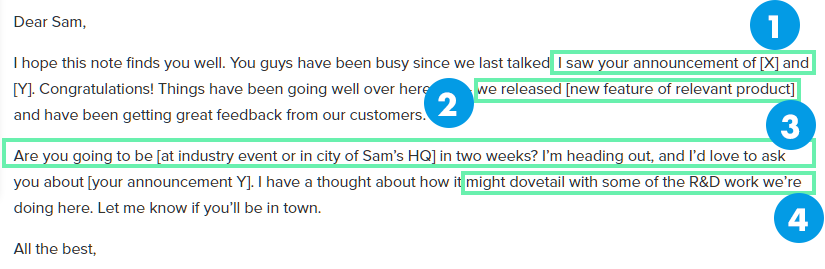
Lots to love here, especially how it kickstarts the conversation by focusing on something relevant to the prospect.
- Give a reason for the email. This could be anything – a new product launch, announcement, or even blog post. This works much better than a simple “just following up” message since it allows you to tie your pitch to something the prospect cares about.
- Update your prospect about your product. Mention any product updates or recent changes at your company. This will help you lead the conversation back to your product and give the impression that you’re conversing, not just pitching.
- Push for a meeting. This can be a virtual or actual meeting. Again, always offer exact dates/times and locations to make scheduling easier.
- Close with a benefit. Remember: emailing is always about how you can help the prospect, not vice versa. Before you close, show the prospect how the meeting/conversation might benefit them.
- Subject line: A great one for this could be: Congrats re: your news on <insert>
Professional Business Email Examples for HR and Recruiting
Not all business emails are about making sales. Some of the most challenging messages involve saying no gracefully or managing professional boundaries.These business email examples demonstrate how to handle delicate situations like rejecting job applications or declining requests for your time. Learn how to maintain your professional reputation while protecting your resources and focusing on your priorities.
Rejecting a Job Application
As a business owner, you’ll often have to say “no” to job applicants, salespeople, and other businesses.And if you’re a public figure, you’ll also have to say no to unsolicited questions and offers (something I can attest to personally).
It’s tempting to ignore such emails or reply tersely. After all, you’re short on time and have a business to run.
But I believe otherwise. If you can be gracious and generous even in your rejection emails, your readers, prospects, and future partners will love you even more.
This template comes from Michael Hyatt, who, as the former CEO of a major company and the owner of a popular blog, knows a thing or two about unsolicited email.
This business email template deals with an unsolicited job application:
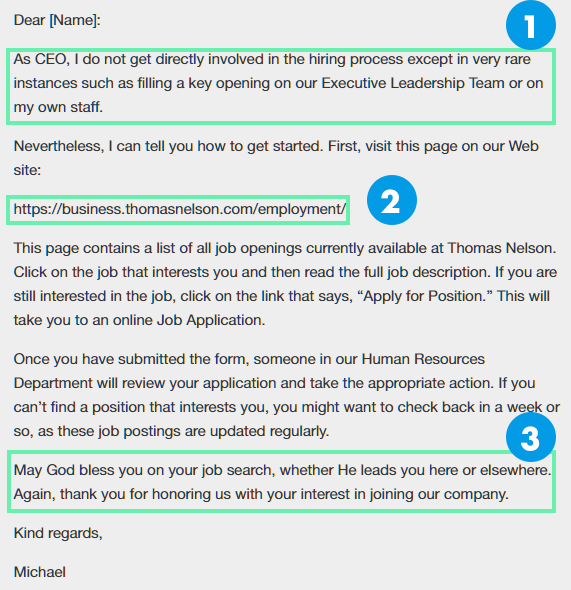
Michael’s email is extraordinarily kind and has the same steady, generous tone as his blog. Plus, it’s easy to personalize and doesn’t look like a cookie-cutter automated email.
Here’s what I love about it:
- Explain why you can’t help. You might be tempted to say “I’m busy!” but you can do one better and tell the recipient exactly why you can’t reciprocate: you have other commitments or don’t handle that work.
- Tell recipients where they can get help. It’s no good telling people you can’t help; you should also point them in the right direction. In this case, Michael directs the recipient to a resource page on his company's website and offers instructions on applying. This is copy-pasted content, but you wouldn’t know it at first glance.
- Thank the recipient for the email. What kind of copy you include in the “thank you” paragraph is up to you, but Michael’s idea of “honoring us with your interest” is solid. It’s impossible not to smile a little if you got that note in your rejection email.
Saying “No” to Unsolicited Questions
If you’re in any visible leadership position, you’ve likely received emails from other business people asking you for advice or “just 20 minutes of your time.”While you would love to help them out, you just don’t have the time.
Here’s how Michael deals with this (while generating leads for his services):
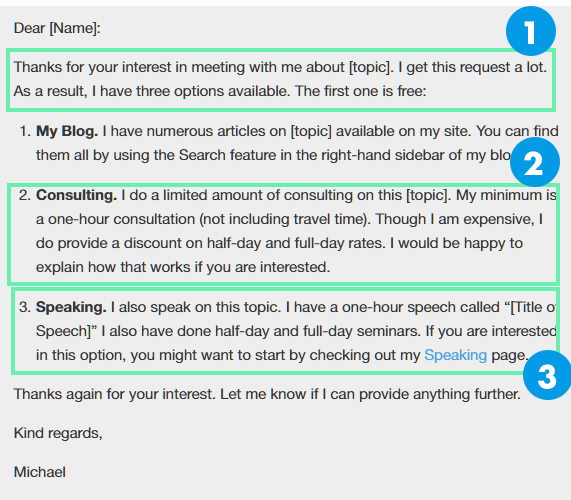
This has the same gracious tone as his job application rejection email, except it includes a plug for his consulting and speaking services.
- Offer a “free” resource or service. Not everyone who asks you a question can afford to pay you for consulting. If you have a blog or a resource library, point recipients here – it’s the only fair thing to do.
- Offer paid alternatives. Instead of rejecting the email altogether (or not replying), give recipients an option to buy your time. While you don’t have to include actual rates, telling people you won’t be cheap is a good idea; you don’t want to waste time dealing with tire kickers.
Inbound Marketing Business Email Examples
When prospects come to you, the dynamics change completely. These business email examples showcase how to engage with inbound leads who've already expressed interest through content downloads, demo requests, or sign-ups.Discover the delicate balance between being helpful and sales-focused, and learn how to create automated sequences that feel personal while scaling your inbound marketing efforts.
The Inbound Lead Follow-Up
A lead might have read dozens of blog posts and followed you across social media. However, the first business email template you send the lead is the actual start of your business relationship. After all, this is the first intimate, direct conversation you’ve had with them.For an effective inbound process, resist the urge to sell. Instead, do what you’re already doing—help the lead.
Here’s a template for following up on an inbound lead:
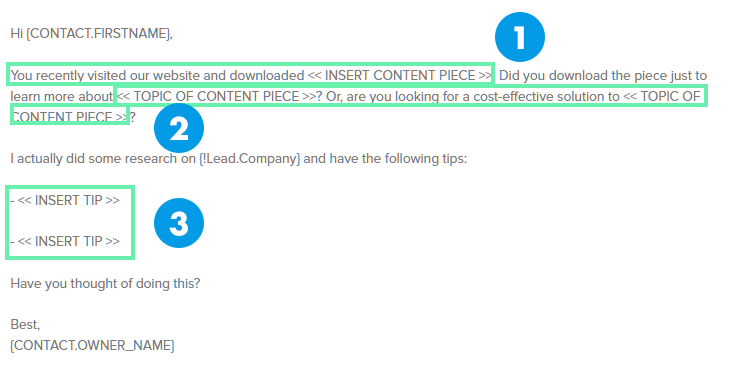
Notice these things:
- Remind the lead of the context of your email. The lead might have downloaded multiple resources that day, so it’s always a good idea to remind them where you got their email information.
- Ask if they want more information. Helpful content is the foundation of inbound marketing. Ask the lead if they want more information, then direct them to the right resource.
- Share tips. This could be generic tips (for an automated email), but you’ll see much better results by sharing personalized, pointed tips. These should be relevant to the resource the lead downloaded and your business’s expertise.
The Automated Inbound Lead Follow-Up Email
Did you know that responding to an inbound lead within 5 minutes increases chances of conversion by 900%?
Obviously, you can’t send a highly personalized business email template in 5 minutes. The best you can do is to personalize a template and send it automatically to every incoming lead.
Here’s a template you can use for this:
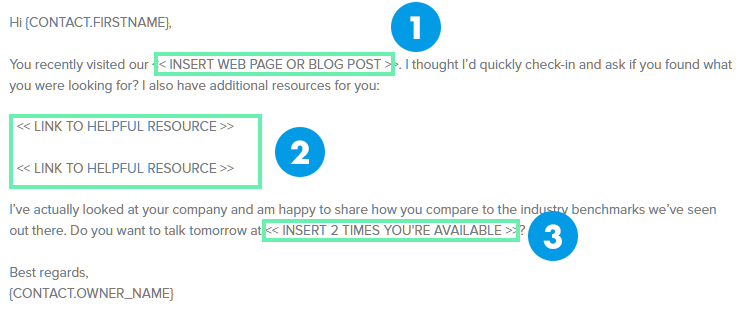
This email doesn’t require a lot of information to sound like it’s personalized. You can:
- Use the resource name. It’s better to use the actual name than add a link to the resource. This not only reminds the lead of the context of your conversation but also personalizes the email.
- Link out to additional content based on the downloaded resource. You can have generic rules for linking to different content based on the downloaded resource. For instance, you can link to your social media blog posts for someone who downloads a “social media 101” eBook.
- Include time slots when you’re free. If you are free every Thursday and Friday at 2 p.m., include this in all automated emails. It’s not always a great idea to try to talk in the first email, but if you feel that the lead is warm enough after asking the right sales probing questions, you can give this a try to speed up the sales email sequence.
- Subject Line: This could be a simple “Quick Question” or “Appropriate Person To Ask”
Networking and Introduction Business Email Examples
Professional networking through email requires finesse and strategic thinking. Whether you're introducing yourself to a new contact or facilitating connections between others, these business email examples show you how to build meaningful professional relationships.Learn the art of mutual introduction and self-introduction and how to leverage your network to create value for everyone involved.
Introducing Yourself to a Contact
Let’s say you want to expand your business to a new area (say, cybersecurity). Your friend, Mike, asks you to contact his friend, Matt, who is a cybersecurity expert.What kind of business email template should you send Matt?
Here’s a template from Danny Rubin for this situation:
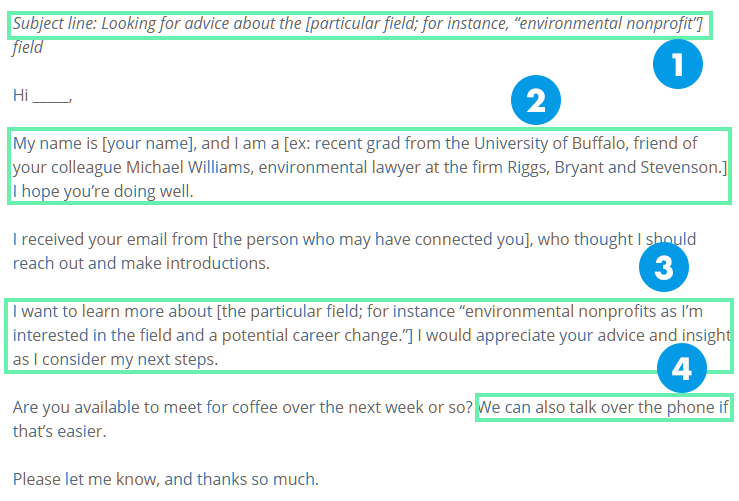
As far as emails go, this is pretty straightforward, and that’s exactly the point. In an introduction email, you want to be compact and precise. Tell recipients who you are and what you need from them. The fact that you’re coming from a common contact means that you already have their attention.
This email does that perfectly.
- Mention the recipient’s field. If you were an expert on VPNs, an email that mentioned your expertise would likely get your attention. This email does precisely that with its subject line.
- Keep your introduction short. You don’t need to tell the recipient anything beyond your name and critical background info. Remember: since you have a common contact, you’re already “vouched” in the recipient’s eyes.
- Give a reason for the email. In short, state why you’re emailing. The "because" here is critical—as I mentioned before, it gives your email a purpose and increases its chances of success.
- Ask for a big favor, then a small favor. In all likelihood, the people you’re emailing would be busy. When you offer to grab a cup of coffee, they might show some resistance. In contrast, an offer for a phone call sounds downright easy. Stacking your requests this way means that your second offer (a phone call) sounds much more attractive when contrasted against the original request.
- Subject line: Looking for advice about <insert specific area of study>
Customer Onboarding Business Email Examples
First impressions matter, especially when welcoming new customers to your product or service. The business email examples in this section focus on creating exceptional onboarding experiences that set the tone for long-term customer relationships.From welcome emails that delight to educational sequences that ensure product adoption, these templates help you turn new sign-ups into engaged, successful users.
The “Welcome” Email
This isn’t really all you will have to do, but if you have a product or service people can sign up for (like JustReachOut), the “welcome” email will be one of the most important emails you send.After all, this is the first email you send out to new users. You want this experience to be positive and informative. How the user sees you and your product/service will depend on this first interaction.
Here’s a business email template from Dan Martell of Clarity that works particularly well:
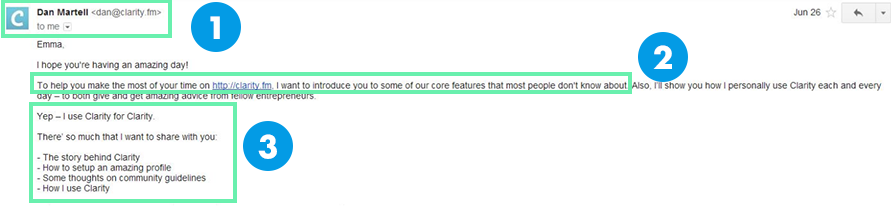
Look what Dan’s doing here:
- The email comes from a person, not a generic address. There is no “noreply@yourbusinessname.com.” This one comes directly from the company’s founder. Also, notice the Clarity logo in the user avatar (from Google+).
- The reason for the email. Sure, a simple “welcome!” message works, but you can go into a bit more detail and state exactly why you’re emailing to give better clarity to your users.
- Casual tone (and useful information). Note how the email uses a casual tone and lists exactly what will “show” the recipients. This is a matter of branding, but when you’re emailing as an individual, you can’t go wrong with a conversational tone.
Creating effective business emails goes beyond just following templates. Understanding the fundamental principles behind successful email communication can transform your outreach from mediocre to exceptional.
In this section, we'll explore the essential best practices that make business emails truly effective, from crafting compelling subject lines to optimizing your calls-to-action.
Subject Line Best Practices
Your subject line determines whether your email gets opened or ignored. In analyzing hundreds of successful business email examples, we've found that the best subject lines share several characteristics.They're specific rather than vague, create curiosity without being clickbait, and often include personalization elements that make recipients feel the message is tailored to them.
Keep your subject lines under 60 characters to ensure they display correctly on mobile devices. Use powerful words that evoke emotion or urgency, but avoid spam-trigger words like "free" or excessive punctuation.
Testing has shown that subject lines with numbers or specific benefits tend to outperform generic ones. For instance, "Quick question about your Q3 marketing goals" performs better than "Following up on our conversation."
Consider using pattern interrupts in your subject lines. Use unexpected words or phrases that stand out in a crowded inbox. The Statista example we examined earlier used "hopes to help," which sets a helpful, non-salesy tone right from the subject line.
Remember, your subject line should accurately reflect your email's content while being intriguing enough to warrant an open.
Personalization Tips
Personalization goes beyond inserting someone's first name in the greeting. The most effective business emails demonstrate deep personalization that shows you've done your homework.This includes referencing recent company news, mentioning their industry's challenges, or connecting your outreach to their stated business goals.
Studies show that emails with advanced personalization generate 6x higher transaction rates. Start by segmenting your audience based on industry, company size, or stage in the buying journey.
Then craft messages that speak directly to each segment's unique challenges and aspirations. For example, a startup CEO faces different challenges than an enterprise VP, and your emails should reflect this understanding.
Layer your personalization throughout the email, not just in the opening line. Reference specific pages they visited on your website, content they've downloaded, or interactions they've had with your brand.
The key is making each touchpoint feel like a natural continuation of an ongoing conversation rather than a mass-marketed message.
Call-to-Action Optimization
Every business email needs a clear next step, but many professionals bury their calls-to-action or make them too vague. The best business emails feature CTAs that are specific, easy to act upon, and aligned with where the recipient is in their journey.Instead of "Let me know if you're interested," try "Are you available for a 15-minute call Thursday at 2 PM EST?"
Reduce friction by making your CTA as simple as possible. If you're asking for a meeting, propose specific times. If you're sharing content, include the link directly in the email rather than asking them to reply.
The break-up email examples we reviewed excel at this by offering numbered response options that take seconds to complete.
Position your primary CTA strategically within your email. While conventional wisdom suggests placing it at the end, testing shows that repeating your CTA or placing it after you've delivered value can increase response rates.
Always ensure your CTA stands out visually, whether through formatting, white space, or button design in HTML emails.
Common Mistakes to Avoid in Business Emails
Even experienced professionals fall into email pitfalls that diminish their effectiveness. By understanding these common mistakes, you can ensure your business emails stand out for the right reasons.This section identifies the most frequent errors in business communication and provides actionable strategies to avoid them.
Overly Formal Language
Many professionals believe business emails require stiff, formal language to appear professional. However, the most effective business emails we've analyzed use conversational, approachable tones while maintaining professionalism.Overly formal language creates distance between you and your recipient, making it harder to build genuine connections.
Consider the difference between "I am writing to inquire about your availability for a meeting regarding our services" and "I'd love to chat about how we might be able to help with your marketing challenges."
The second version feels more personal and inviting while remaining professional. The key is matching your tone to your audience and context while erring on the side of being human and relatable.
Avoid business jargon and buzzwords that obscure your message. Phrases like "synergistic partnerships" or "best-in-class solutions" have become so overused they've lost meaning.
Instead, use clear, specific language that explains exactly what you offer and why it matters. Remember, clarity trumps complexity in effective business communication.
Missing Clear CTAs
One of the biggest mistakes in business emails is leaving recipients unsure about what to do next. Vague endings like "Let me know your thoughts" or "Looking forward to hearing from you" don't drive action.Every business email should include a specific, actionable next step that moves your relationship forward.
Your CTA should match the stage of your relationship. Early interactions might call for softer CTAs like "Would you be interested in a 15-minute call to discuss this further?" while warmer leads might receive more direct asks like "Can we schedule a demo for Tuesday at 2 PM?"
Don't include multiple competing CTAs that confuse recipients. If you want them to schedule a meeting, don't ask them to download a whitepaper and follow you on LinkedIn in the same email.
Focus on one primary action and make it the obvious next step. Secondary CTAs can be included, but they should be clearly subordinate to your main request.
Poor Mobile Optimization
With over 50% of emails now opened on mobile devices, failing to optimize for mobile viewing is a critical mistake. Many business emails that look perfect on desktops become unreadable walls of text on smartphones.Long paragraphs, tiny fonts, and clustered links create frustrating experiences that lead to immediate deletion.
Keep paragraphs short – ideally 2-3 sentences maximum. Use bullet points and numbered lists to break up text and make scanning easier. Ensure any links or buttons are large enough to tap with a finger and spaced far enough apart to avoid accidental clicks.
Test your emails on multiple devices before sending to ensure they're readable everywhere.
Consider mobile users when crafting your message length. While desktop readers might engage with longer emails, mobile users prefer concise messages they can digest quickly.
Front-load your most important information and value proposition. If you must include longer content, summarize key points upfront and provide a clear reason for recipients to continue reading.
Measuring the Success of Your Business Emails
Sending emails is only half the equation – understanding their performance is what separates amateur outreach from professional campaigns.This section explores the metrics that matter, testing strategies that drive improvement, and how to build a culture of continuous optimization in your email communication.
Key Metrics to Track
While open and click rates get the most attention, understanding your business email performance requires deeper analysis.Open rates indicate subject line effectiveness and sender reputation, but don't tell the whole story. Track reply rates to measure message resonance, conversion rates to assess bottom-line impact, and forward rates to gauge content value.
Pay attention to negative metrics too. Unsubscribe rates reveal when you're missing the mark, while spam complaints can damage your sender reputation.
Monitor bounce rates to maintain list hygiene and ensure you're reaching valid addresses. Time-based metrics like time to open and time to respond help optimize sending schedules and follow-up timing.
Create dashboards that connect email metrics to business outcomes. Track how email-generated leads progress through your sales funnel, measure customer lifetime value by acquisition source, and calculate the true ROI of your email efforts.
The best business emails come from teams that obsess over data and continuously refine their approach based on results.
A/B Testing Strategies
Testing transforms good business emails into great ones. Start with high-impact elements like subject lines, where small changes can dramatically affect open rates.Test different approaches: questions vs. statements, personalization vs. generic, benefit-focused vs. curiosity-driven. Run tests for statistical significance – typically requiring at least 1,000 sends per variation.
Beyond subject lines, test email elements systematically. Experiment with different CTAs, message lengths, personalization levels, and sending times. Test formatting choices like plain text vs. HTML, bullet points vs. paragraphs, and image inclusion. The key is testing one element at a time to identify what drives improvement.
Document your testing insights to build institutional knowledge. Create a testing calendar that ensures continuous experimentation without overwhelming your team.
Share results across departments – what works for sales emails might inform marketing campaigns and vice versa. Remember, what works for one audience segment might not work for another, so segment your tests accordingly.
Even More Resources
Like my last post on email templates, I want to close by providing a list of resources for learning about business email.These are resources I’ve personally used to build connections, score interviews, get guest spots, introduce new people, and of course, make sales.
Here you go:
GoodEmailCopy.com
Whenever I get stuck or can’t think of anything worthwhile to say in my emails – or how to say it – I head to GoodEmailCopy.comThis site curates emails from some of the web’s best brands. Use it to find inspiration and to see how the world’s best brands increase conversion rates.
Newsletter Template
As you know, email is 40x more effective in acquiring customers than social media. Growing your email list is a no-brainer for any business. Knowing what to send them is something I always struggle with. I usually turn to this article from Vengage, which shares 67+ examples and tips for writing your newsletter template.Definitive Guide on Email Marketing for Beginners
Email marketing is an art form, and if you’ve never done it before, it’s really useful to have a guide with real-life templates and examples you can reference.When I first started with email marketing, I did not have something like this in front of me, and as a result, I made similar mistakes over and over again.
I like this GetResponse guide because it’s narrated by a real person and has an audio component, which is really lovely.
This guide will help you get your feet wet when it comes to email marketing. If you’re new to this practice, this is a great post to start with.
25 Emails that Target Each Stage of the Customer Lifecycle
Want to send emails to a top-of-the-funnel customer? Customer service teams send these emails all the time. How about a late funnel customer who is just about to buy from you (and needs a final push)?These 25 emails cover every stage of the customer lifecycle. Refer to them when you need ideas or guidance.
[Benchmark] What’s a Good Email Open and Click Rate?
How do your business emails stack up against the competition?Use this benchmark data from HubSpot to figure it out.
How to Create an Effective “Welcome” Series
I’ve touched upon welcome emails only too briefly. This post from Emma goes much, much deeper than I could. It's a MUST-read if you’re writing emails to welcome new users.How to Generate More Sales from Your Email Marketing Campaigns
Crafting a great email is only one half of the business email equation. There are plenty of other nuts and bolts you need to tinker with to get actual sales and conversions.This post from the always great Peep Laja throws light on some tactics you can use to turn email opens into $$$.
A/B Testing Guide for Emails
Marketing is all about testing, and that includes your business emails.But how can you A/B test your emails?
Read this post from Zapier to learn more.
Over to You
So that’s a wrap! I hope you have found these templates and resources as helpful as they have been to me.Before you go, make sure to download the templates I’ve personally used to get responses from some of the world’s busiest people.
Frequently Asked Questions
How Do I Write Effective Follow-Up Emails Without Being Pushy or Annoying?
Focus on delivering new value in each follow-up rather than simply "bumping" your previous message. Reference recent developments, share relevant content, or provide additional insights that benefit the recipient.Use the "break-up" email strategy as a final touchpoint. It creates urgency while giving prospects an easy way to re-engage on their timeline. Always include a clear reason for following up, and avoid generic phrases like "just checking in."
What's the Difference Between Cold Emails and Business Emails, and When Should I Use Each Approach?
Cold emails prioritize grabbing attention from completely unknown prospects, while business emails focus on nurturing existing relationships and driving specific business outcomes. Use cold email tactics when contacting people who've never heard of you or your company.Switch to business email strategies once you have some level of relationship—whether through referrals, website visits, content downloads, or previous interactions. Business emails assume more context and can dive deeper into value propositions.
How Can I Personalize Emails at Scale Without Spending Hours Researching Each Prospect?
Layer your personalization strategically. Start with basic segmentation by industry, company size, or behavior (like content downloads). Use tools to track website visits and reference specific pages viewed.Create templates with variable fields for easy customization—company name, recent announcements, or industry-specific pain points. Focus your deep research time on your highest-value prospects, using smart automation and templated personalization for broader outreach.
What Are the Most Common Mistakes I Should Fix First?
Check these four critical areas:(1) Subject lines: Ensure they're under 60 characters, specific, and create curiosity without being clickbait.
(2) Mobile optimization: Keep paragraphs short and ensure your emails are readable on smartphones.
(3) Clear CTAs: Every email needs one specific, actionable next step rather than vague requests.
(4) Value proposition: Lead with how you can help the recipient achieve their goals, not what you want from them. Most failed business emails suffer from being too self-focused rather than recipient-focused.
Get the full playbook in your inbox.
20,000+ founders read my newsletter on building to acquisition in 3 years, working 3 hours a day.
